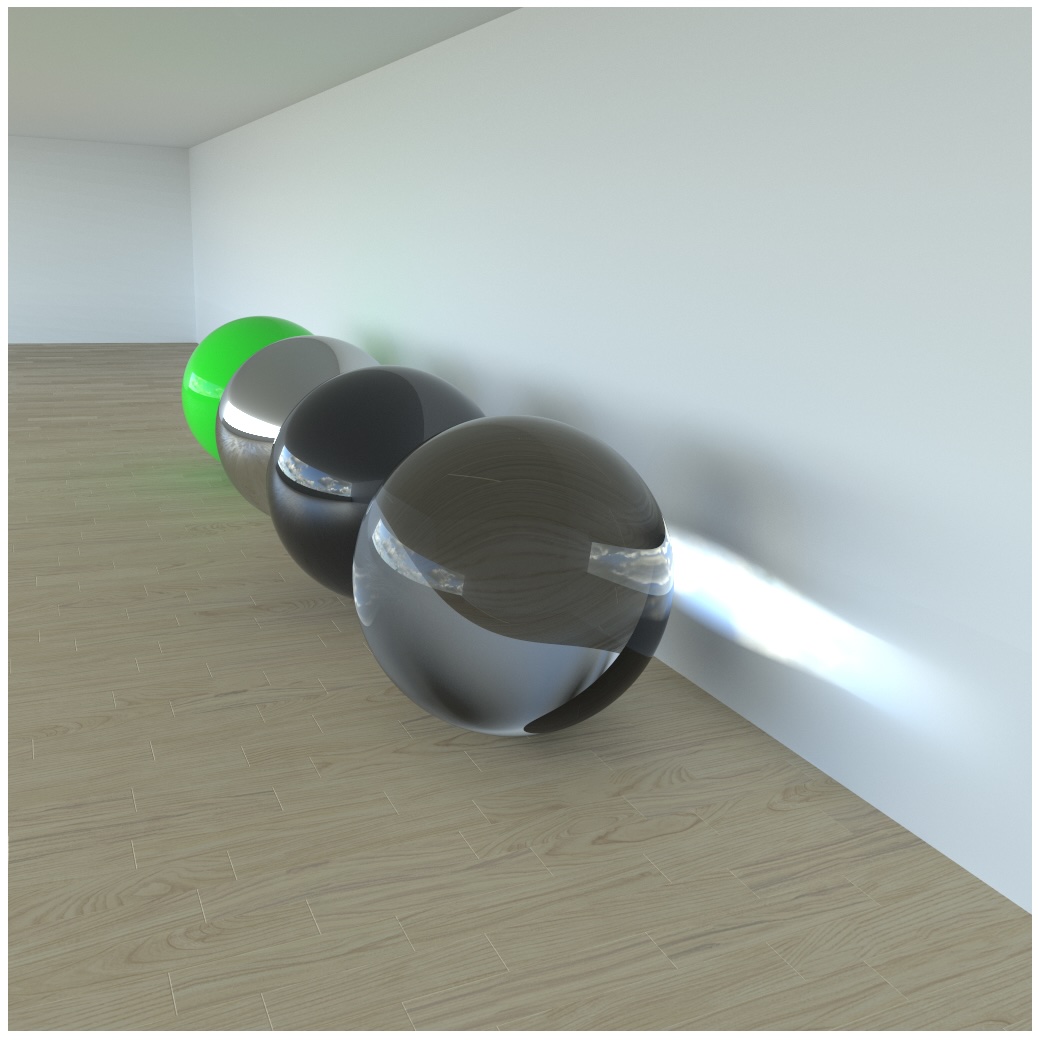
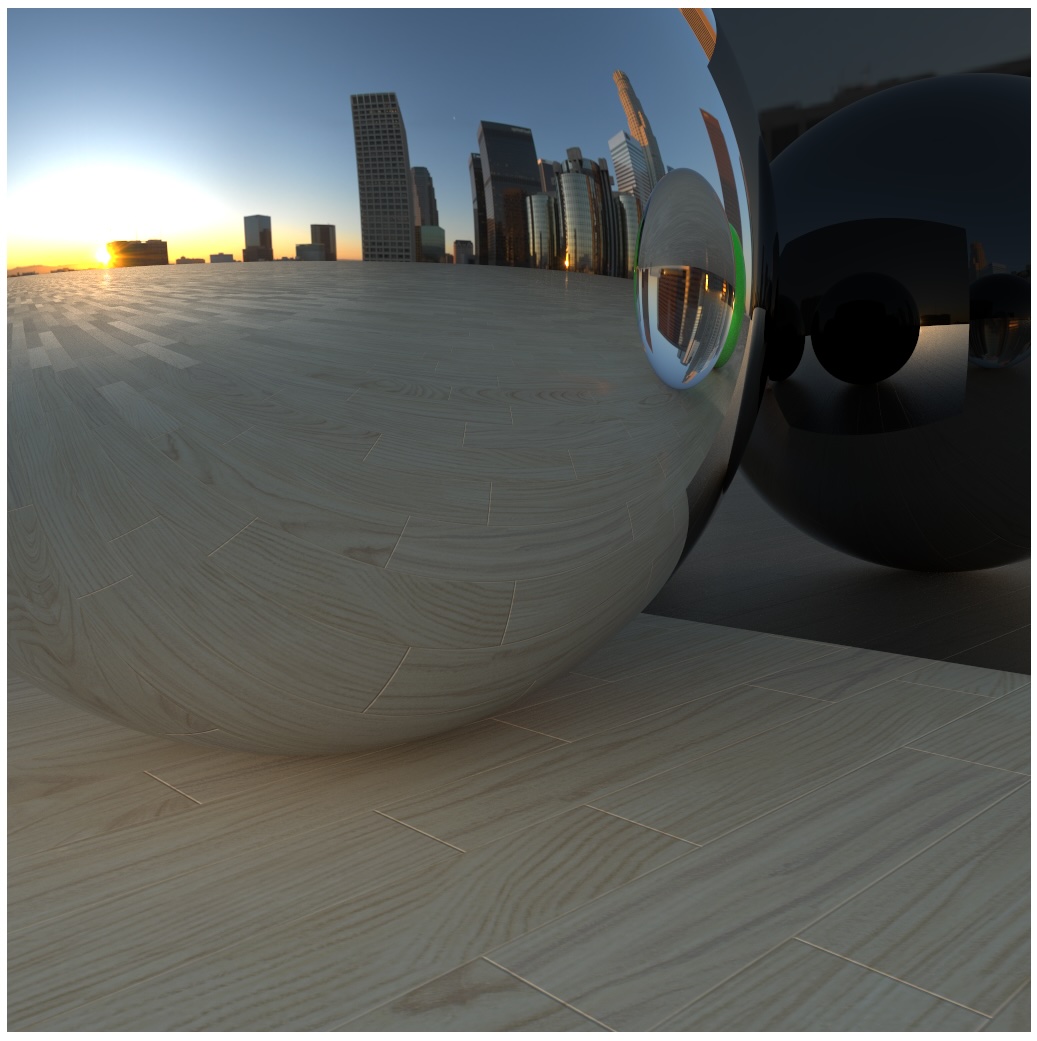
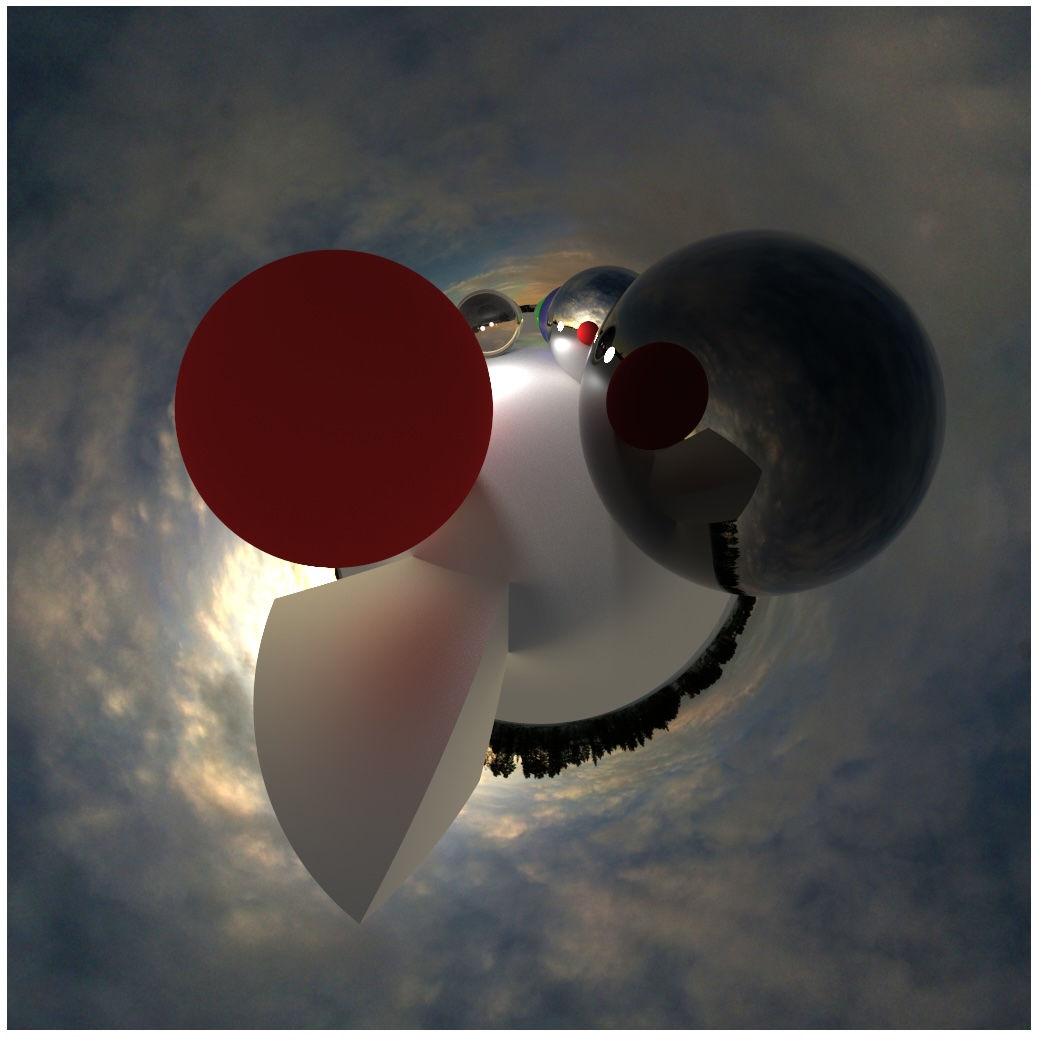
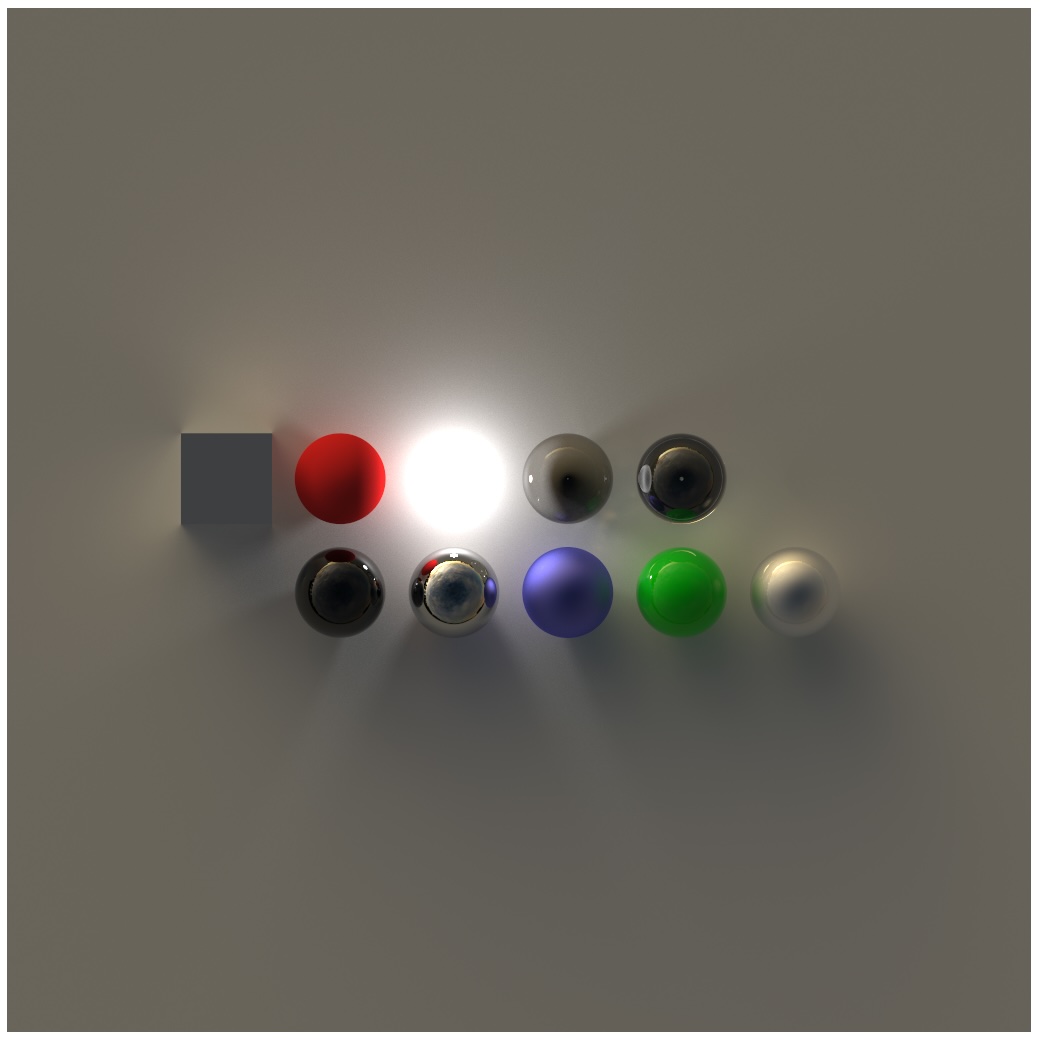
<?xml version="1.0" encoding="utf-8"?><feed xmlns="http://www.w3.org/2005/Atom" ><generator uri="https://jekyllrb.com/" version="3.10.0">Jekyll</generator><link href="https://jonathanolson.net/feed.xml" rel="self" type="application/atom+xml" /><link href="https://jonathanolson.net/" rel="alternate" type="text/html" /><updated>2026-04-23T00:11:33+00:00</updated><id>https://jonathanolson.net/feed.xml</id><title type="html">Jonathan Olson</title><subtitle>As a passionate software engineer, I develop free open-source educational tools for PhET Interactive Simulations, lead  the development of their rendering engine, and pursue diverse personal projects.</subtitle><author><name>Jonathan Olson</name></author><entry><title type="html">Exact Polygonal Filtering</title><link href="https://jonathanolson.net/exact-polygonal-filtering" rel="alternate" type="text/html" title="Exact Polygonal Filtering" /><published>2024-08-14T00:00:00+00:00</published><updated>2024-08-14T00:00:00+00:00</updated><id>https://jonathanolson.net/exact-polygonal-filtering</id><content type="html" xml:base="https://jonathanolson.net/exact-polygonal-filtering"><![CDATA[<link href="/css/exact-polygonal-filtering.css" rel="stylesheet">
<aside class="sidebar sidebar-left">
  <div class="sticky-content">
		<nav>
      <div>Contents</div>
      <ul>
        <li><a href="#introduction">Introduction</a></li>
        <li><a href="#filters">Filters</a></li>
        <li><a href="#greens-theorem-and-polygons">Green's Theorem and Polygons</a></li>
        <li><a href="#integrating-polynomials-over-polygons">Integrating Polynomials over Polygons</a></li>
        <li><a href="#integrals-for-filters">Integrals for Filters</a></li>
        <li><a href="#blurring">Blurring</a></li>
        <li><a href="#implementation">Implementation</a></li>
      </ul>
		</nav>
  </div>
</aside>
<main>
  <section id="introduction">
    <p>
      Efficient and accurate filtering of polygonal shapes can be achieved with closed-form solutions based on Green's
      theorem with piecewise-polynomial filters (e.g. box/bilinear/bicubic).
    </p>

    <p id="no-webgpu-0" style="display: none; color: red; font-size: 70%; opacity: 70%; text-align: center;">
      WebGPU not detected, falling back to a single-frame CPU render below.
    </p>

    <div style="text-align: center;">
      <figure class="wrap-figure">
        <canvas id="siemens-canvas" alt="Displays a Siemens Star and checkerboard pattern using Canvas in your browser" style="width: 128px; height: 192px;"></canvas>
        <figcaption>
          Canvas
        </figcaption>
      </figure>

      <figure class="wrap-figure">
        <svg id="siemens-svg" role="img" alt="Displays a Siemens Star and checkerboard pattern using SVG in your browser" style="width: 128px; height: 192px; vertical-align: baseline;"></svg>
        <figcaption>
          SVG
        </figcaption>
      </figure>

      <figure class="wrap-figure">
        <canvas id="siemens-box" alt="Displays a Siemens Star and checkerboard pattern using a box filter" style="width: 128px; height: 192px;"></canvas>
        <figcaption>
          Box Filter
        </figcaption>
      </figure>

      <figure class="wrap-figure">
        <canvas id="siemens-bilinear" alt="Displays a Siemens Star and checkerboard pattern using a bilinear filter" style="width: 128px; height: 192px;"></canvas>
        <figcaption>
          Bilinear Filter
        </figcaption>
      </figure>
    </div>

    <p>
      Instead of relying on pixel-approximations or super-sampling to achieve filtering effects, it is possible to
      directly compute the exact filtered coverage, by:
    </p>

    <ul class="text-list">
      <li>Breaking the polygon up into smaller (usually-pixel-sized) clipped polygons</li>
      <li>Evaluating the filter integral directly for each clipped polygon</li>
    </ul>

    <p>
      Furthermore, this can be done on the GPU, and is demonstrated in WebGPU in this article (if it is enabled).
    </p>

    <h2>Introduction</h2>

    <p>
      Rasterization is the process of converting vector graphics into pixel data. When rendering a polygon, the rasterizer
      needs to determine how much the polygon <em>covers</em> each pixel, so that it can determine the polygon's contribution
      to the pixel.
    </p>

    <p>
      A fast approach, given many polygons, is to see how much of each polygon is contained within the box of each pixel.
      However, when polygons overlap, this approach can lead to over-coverage, and can result in incorrect blending
      known as <a href="https://phetsims.github.io/alpenglow/#overview-conflation">conflation artifacts</a>. To avoid this,
      it is ideal to compute exact (non-overlapping) coverage, but it can also be approximated by super-sampling.
    </p>

    <p>
      <em>Filtering</em> is a key component of anti-aliasing, which is used to reduce the visual artifacts that occur when rendering
      high-frequency content at a lower resolution.
    </p>

    <p>
      Browsers' built-in anti-aliasing for SVG and Canvas shapes, particularly when animated, usually does not include
      a significant amount of filtering. When displaying certain shapes, this results in aliasing artifacts that can be
      distracting or even misleading.
    </p>

  </section>
  <section id="filters">
    <h2>Filters</h2>

    <p>
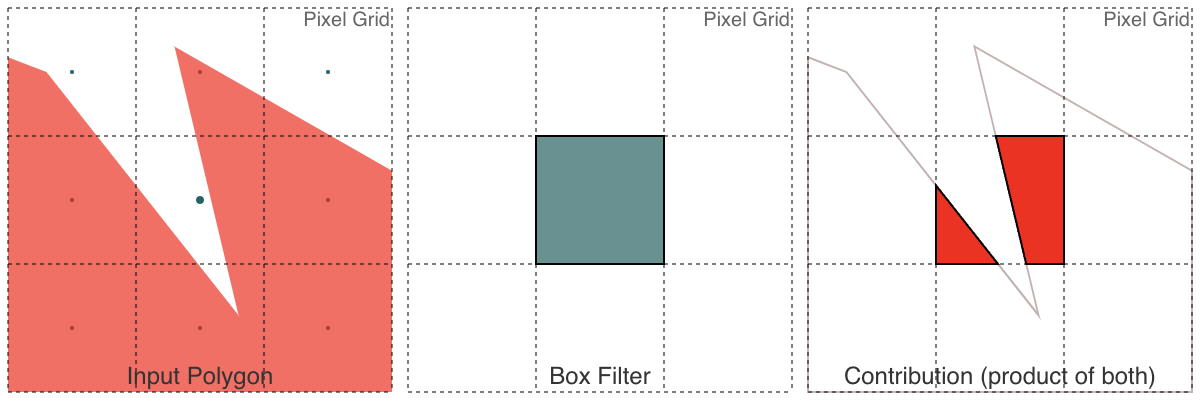
      While <a href="http://alvyray.com/Memos/CG/Microsoft/6_pixel.pdf">a pixel is not a little square</a>, a simple way
      to get a coverage value is to use the area of the polygon that covers the pixel. This is equivalent to applying a
      <em>box filter</em> to the polygon, which is the simplest form of filtering.
    </p>

    <figure>
      <img src="/img/box-filter.png" alt="Box filter" class="medium-figure-image">
      <figcaption>
        Box filter
      </figcaption>
    </figure>

    <p>
      While the box filter results in a sharp result, it can result in
      <a href="https://en.wikipedia.org/wiki/Spatial_anti-aliasing#Examples">spatial aliasing artifacts</a>.
      These can be reduced by using other filters. Instead of taking the area of the polygon that covers a square around
      the center of the pixel, others will evaluate a different weighted function over the polygon.
    </p>

    <p>
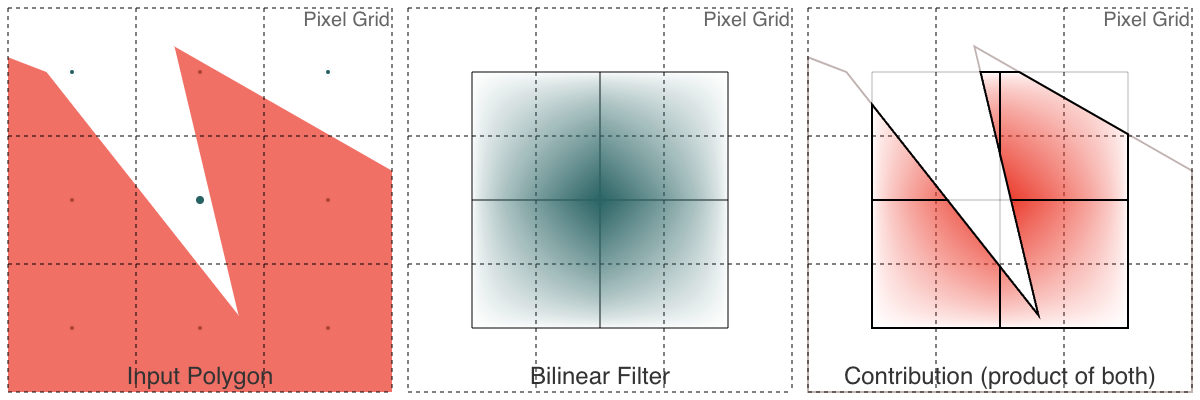
      The <a href="https://en.wikipedia.org/wiki/Bilinear_interpolation">bilinear</a> and
      <a href="https://en.wikipedia.org/wiki/Mitchell%E2%80%93Netravali_filters">Mitchell-Netravali (bicubic)</a>
      filters are two common filters that are used in practice, and both
      are piecewise-polynomial filters.
    </p>

    <figure>
      <img src="/img/bilinear-filter.png" alt="Bilinear filter" class="medium-figure-image">
      <figcaption>
        Bilinear filter
      </figcaption>
    </figure>

    <figure>
      <img src="/img/mitchell-netravali-filter.png" alt="Mitchell-Netravali (bicubic) filter" class="medium-figure-image">
      <figcaption>
        Mitchell-Netravali (bicubic) filter
      </figcaption>
    </figure>

    <p>
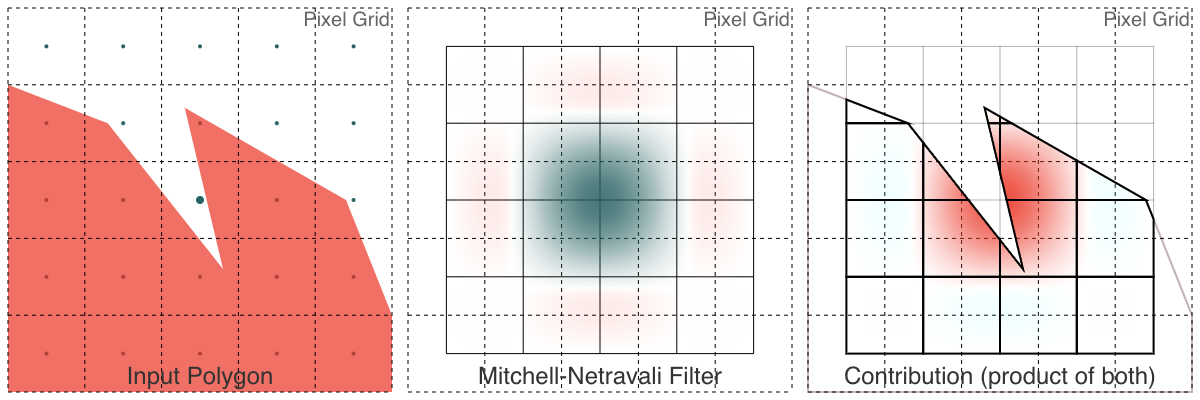
      These piecewise-polynomial filters are equivalent to taking the integral of the piecewise-polynomial function
      <em>within</em> the polygon, where the filter function is centered at where a sample is being taken. The box
      filter is equivalent to taking the integral of an indicator function that is 1 within the square, and 0 outside.
    </p>

    <p>
      In particular, each of the above filters has one or more clipped areas of the polygon that will
    </p>

  </section>
  <section id="greens-theorem-and-polygons">
    <h2>Green's Theorem and Polygons</h2>

    <p>
      We will dive into the math behind how we can evaluate the integral of a filter over a polygon using Green's Theorem.
      For more related results, see <a href="https://phetsims.github.io/alpenglow/#antialiasing-integrals">Alpenglow's integrals for anti-aliasing</a>.
    </p>

    <p>
      Overall:
    </p>

    <ul class="text-list">
      <li>To evaluate an integral (i.e. a filter) over a shape, we can instead evaluate an integral over the boundary.</li>
      <li>For polygons, this means we can evaluate an expression for each edge (given $x_0$, $y_0$, $x_1$, and $y_1$), and sum those up.</li>
      <li>If the integrand is a polynomial, we get a closed-form solution that can be evaluated directly.</li>
    </ul>

    <p>
      Using <a href="https://en.wikipedia.org/wiki/Green%27s_theorem">Green's Theorem</a>, we can convert a double
      integral over a region into a line integral over the (closed, oriented counter-clockwise) boundary of the region:
    </p>

    <p>
      $$
      \oint_P\left(L\,\frac{dx}{dt}+M\,\frac{dy}{dt}\right)dt=\iint_P \left( \frac{\partial M}{\partial x}-\frac{\partial L}{\partial y} \right)\,dx\,dy
      $$
    </p>

    <p>
      for curves parameterized on $t$.
    </p>

    <p>
      For polygons, this means that if we can evaluate a line integral over each line segment (between $(x_i,y_i)$ and
      $(x_{i+1},y_{i+1})$, finishing with $(x_i,y_i)$ to $(x_0,y_0)$), we can sum up each edge's contribution to
      evaluate the double integral for the region inside the polygon. Each line segment is parameterized curve:
    </p>

    <p>
      $$
      x=x(t)=(1-t)x_i+(t)x_{i+1}=x_i+t(x_{i+1}-x_i)
      $$

      $$
      y=y(t)=(1-t)y_i+(t)y_{i+1}=y_i+t(y_{i+1}-y_i)
      $$

      for $0 \le t \le 1$, with the derivatives:

      $$
      \frac{dx}{dt}=x_{i+1}-x_i
      $$

      $$
      \frac{dy}{dt}=y_{i+1}-y_i
      $$

      Note:
    </p>

    <ol class="text-list">
      <li>
        If we reverse an edge (swap its endpoints), it will swap the sign of the contribution to the integral (a polygon
        can make a degenerate turn and double-back precisely, with no contribution to area). Thus for terms, swapping $i$
        and $i+1$ will swap the sign of the contribution. This means that polygons with holes can be evaluated by
        visiting the holes with the opposite orientation (clockwise).
      </li>
      <li>
        This is evaluated on closed polygons, so any terms that only depend on one endpoint will cancel out (e.g.
        $x_i^2y_i$ and $-x_{i+1}^2y_{i+1}$ will have their contributions cancel out, since both of those will be
        evaluated for every point in the polygon). It is useful to adjust the coefficients to these terms, since they
        can allow us to factor the expressions into simpler forms (e.g. the Shoelace formula below).
      </li>
    </ol>

    <p>
      We can pick $L$ and $M$ below:

      $$
      L=(n-1)\int f\,dy
      $$

      $$
      M=(n)\int f\,dx
      $$

      so that

      $$
      \iint_P \left( \frac{\partial M}{\partial x}-\frac{\partial L}{\partial y} \right)\,dx\,dy=
      \iint_P \left( (n)f - (n-1)f \right)\,dx\,dy=
      \iint_P f\,dx\,dy
      $$

      for any antiderivatives and real $n$, since the double integral will then be integrating our function $f$. It turns
      out, evaluating Green's Theorem over line segments for polynomial terms for any linear blend (any $n$) of $L$ and
      $M$ will differ only in the "canceled out" terms, so each edge's contribution will be the same.
    </p>
  </section>
  <section id="integrating-polynomials-over-polygons">
    <h2>Integrating Polynomials over Polygons</h2>

    <p>
      If we zero out all of the canceled terms, it turns out that we can evaluate the integral of any polynomial term $x^my^n$ over a polygon $P$ by summing up the contributions of each edge:
    </p>
    <p style="font-size: 60%;">
      $$
      \iint_Px^my^n\,dx\,dy=\frac{m!n!}{(m+n+2)!}\sum_{i}\left[ (x_iy_{i+1}-x_{i+1}y_i) \sum_{p=0}^m\sum_{q=0}^n \binom{p+q}{q}\binom{m+n-p-q}{n-q}x_i^{m-p}x_{i+1}^py_i^{n-q}y_{i+1}^q \right]
      \tag{1}
      $$
    </p>
    <p>
      This was first discovered by <a href="https://repository.tudelft.nl/islandora/object/uuid%3A963296a1-8940-4439-9404-eca1bd2f8638">Soerjadi in 1968</a>.
      The contributions of each term can be summed up individually to integrate arbitrary polynomials.
    </p>

    <p>
      e.g. for $x^4y^2$ in matrix form:
    </p>
    <p style="font-size: 60%;">
      $$
      \iint_Px^4y^2\,dx\,dy=
      \frac{1}{840}
      \sum_{i}
      \left(
      (x_iy_{i+1}-x_{i+1}y_i)
      \begin{bmatrix}
      x_i^4 & x_i^3x_{i+1} & x_i^2x_{i+1}^2 & x_ix_{i+1}^3 & x_{i+1}^4
      \end{bmatrix}
      \begin{bmatrix}
      15 & 5 & 1\\
      10 & 8 & 3\\
      6 & 9 & 6\\
      3 & 8 & 10\\
      1 & 5 & 15
      \end{bmatrix}
      \begin{bmatrix}
      y_i^2\\
      y_iy_{i+1}\\
      y_{i+1}^2
      \end{bmatrix}
      \right)
      $$
    </p>

    <p>
      Any polynomial-based (windowed or not) filter can be evaluated over a polygon with this approach. It may be
      feasible to approximate Gaussian/Sinc filters with polynomials, or find iterative approaches to converge to the
      integral.
    </p>
  </section>
  <section id="integrals-for-filters">
    <h2>Integrals for Filters</h2>

    <h3>Box Filter (Area)</h3>

    <p>
      As seen above, the box filter is equivalent to a step function that is 1 within the box and 0 outside. When a polygon
      has been clipped, this is equivalent to evaluating the integral of $1$ inside the polygon (i.e. computing its area).
    </p>

    <figure>
      <img src="/img/box-filter.png" alt="Box filter" class="medium-figure-image">
    </figure>

    <p>
      For $x^0y^0=1$, with adding some canceling terms to better factor, we will obtain the
      <a href="https://en.wikipedia.org/wiki/Shoelace_formula">Shoelace formula</a> for finding the area of a polygon:

      $$
      area_P=\iint_P1\,dx\,dy=
      \frac{1}{2}
      \sum_{i}
      (x_i+x_{i+1})(y_{i+1}-y_i)
      $$
    </p>

    <p>
      This formula will be evaluated (with the appropriate order and orientation) for every edge
      ($x_i$, $y_i$, $x_{i+1}$, $y_{i+1}$) along a polygon. The sum will be the area of the polygon.
    </p>

    <h3>Bilinear Filter</h3>

    <p>
      The <a href="https://en.wikipedia.org/wiki/Bilinear_interpolation">bilinear filter</a> is equivalent to integrating
      the <a href="https://en.wikipedia.org/wiki/Triangular_function">tent function</a> over the polygon. As seen above,
      this is broken into 4 quadrants, each of which is a polynomial function.
    </p>

    <figure>
      <img src="/img/bilinear-filter.png" alt="Bilinear filter" class="medium-figure-image">
    </figure>

    <p>
      Without loss of generality, we can focus on computing the integral solely in the $0\le x\le1,0\le y\le1$ quadrant.
      The integrand is thus:
    </p>

    <p>
      $$
      (1-x)(1-y)=xy-x-y+1
      $$
    </p>

    <p>
      This is a weighted sum of the terms $x^1y^1$, $x^1y^0$, $x^0y^1$, and $x^0y^0$. We can sum up the weighted contribution
      of the corresponding terms from $\tag{1}$, resulting in the following evaluated line integral:
    </p>

    <p style="font-size: 80%">
      $$
      \frac{1}{24}\sum_{i}(x_iy_{i+1}-x_{i+1}y_i)(12-4( x_i+y_i+x_{i+1}+y_{i+1})+2(x_iy_i+x_{i+1}y_{i+1})+
      x_iy_{i+1}+x_{i+1}y_i)
      $$
    </p>

    <p>
      This formula will be evaluated (with the appropriate order and orientation) for every edge
      ($x_i$, $y_i$, $x_{i+1}$, $y_{i+1}$) along a polygon (clipped to the unit square). The sum will be the
      integral of this quadrant of bilinear filter over the polygon (with the filter centered at the origin).
      Coordinate transformations can be used to evaluate the other quadrants (applying the absolute value to inputs).
    </p>

    <p>
      Note that the polygon needs to be clipped so that it is fully contained within the unit square.
    </p>

    <h3>Mitchell-Netravali Filter</h3>

    <p>
      The <a href="https://en.wikipedia.org/wiki/Mitchell%E2%80%93Netravali_filters">Mitchell-Netravali filter family</a>,
      commonly referred to as "bicubic", is a piecewise-polynomial filter that that has a larger support, and includes
      negative lobes to reduce artifacts. It has 16 different polynomial pieces, which will require the integral evaluation
      of 3 different pieces.
    </p>

    <figure>
      <img src="/img/mitchell-netravali-filter.png" alt="Mitchell-Netravali (bicubic) filter" class="medium-figure-image">
    </figure>

    <p>
      We choose to use the "Mitchell-Netravali" filter (specifically with constants $B=1/3$ and $C=1/3$). It is separable
      and symmetric, so the integral is equal to $f(x)f(y)$, combining 1-dimensional kernels. The two polynomial chunks we
      get (assuming a $t > 0$) are:
    </p>

    <p>
      $$
      f_0(t)=\frac{1}{6}\left(7y^3-12t^2+\frac{16}{3}\right)
      $$
    </p>

    <p>
      for $0\le t\le1$, and:
    </p>

    <p>
      $$
      f_1(t)=\frac{1}{6}\left(-\frac{7}{3}y^3+12t^2-20t+\frac{32}{3}\right)
      $$
    </p>

    <p>
      for $1\le t\le2$.
    </p>

    <p>
      Taking into account symmetry, this gives us three different polynomial chunks we will need to evaluate:
    </p>

    <ul class="text-list">
      <li>$f_0(x)f_0(y)$</li>
      <li>$f_0(x)f_1(y)$</li>
      <li>$f_1(x)f_1(y)$</li>
    </ul>

    <p>
      Since the others can be obtained by reversing signs and/or reflection with swapping x/y input.
    </p>

    <p>
      All three of these can be evaluated using the formula $\tag{1}$, since they are simply polynomials in $x$ and $y$.
      Notably:
    </p>

    <p>
      $$
      f_0(x)f_0(y)=
      \begin{bmatrix}1 & x & x^2 & x^3\end{bmatrix}
      \begin{bmatrix}
      \frac{64}{81} & 0 & -\frac{16}{9} & \frac{28}{27}\\
      0 & 0 & 0 & 0\\
      -\frac{16}{9} & 0 & 4 & -\frac{7}{3}\\
      \frac{28}{27} & 0 & -\frac{7}{3} & \frac{49}{36}
      \end{bmatrix}
      \begin{bmatrix}1\\y\\y^2\\y^3\end{bmatrix}
      $$
    </p>

    <p>
      $$
      f_0(x)f_1(y)=
      \begin{bmatrix}1 & x & x^2 & x^3\end{bmatrix}
      \begin{bmatrix}
      \frac{128}{81} & -\frac{80}{27} & \frac{16}{9} & -\frac{28}{81}\\
      0 & 0 & 0 & 0\\
      -\frac{32}{9} & \frac{20}{3} & -4 & \frac{7}{9}\\
      \frac{56}{27} & -\frac{35}{9} & \frac{7}{3} & -\frac{49}{108}
      \end{bmatrix}
      \begin{bmatrix}1\\y\\y^2\\y^3\end{bmatrix}
      $$
    </p>

    <p>
      $$
      f_1(x)f_1(y)=
      \begin{bmatrix}1 & x & x^2 & x^3\end{bmatrix}
      \begin{bmatrix}
      \frac{256}{81} & -\frac{160}{27} & \frac{32}{9} & -\frac{56}{81}\\
      -\frac{160}{27} & \frac{100}{9} & -\frac{20}{3} & \frac{35}{27}\\
      \frac{32}{9} & -\frac{20}{3} & 4 & -\frac{7}{9}\\
      -\frac{56}{81} & \frac{35}{27} & -\frac{7}{9} & \frac{49}{324}\\
      \end{bmatrix}
      \begin{bmatrix}1\\y\\y^2\\y^3\end{bmatrix}
      $$
    </p>

    <p>
      Long story short, evaluating $\tag{1}$ for these, we get some reasonably long expressions that can be evaluated directly.
    </p>

    <p>
      For example: $f_0(x)f_0(y)$ results in:
    </p>

    <p style="font-size: 75%">
    1/51840 ($x_0$ -
   $x_1$) (3 $y_0^4$ (896 + 735 $x_0^3$ + 45 $x_0^2$ (-32 + 7 $x_1$) +
      15 $x_0$ $x_1$ (-32 + 7 $x_1$) + 3 $x_1^2$ (-32 + 7 $x_1$)) +
   128 (160 + 3 $x_0^2$ (-20 + 7 $x_0$) + 6 $x_0$ (-20 + 7 $x_0$) $x_1$ +
      9 (-20 + 7 $x_0$) $x_1^2$ + 84 $x_1^3$) $y_1$ -
   96 (80 + 3 (-4 + $x_0$) $x_0^2$ + 12 (-4 + $x_0$) $x_0$ $x_1$ +
      30 (-4 + $x_0$) $x_1^2$ + 60 $x_1^3$) $y_1^3$ +
   3 (896 + 3 $x_0^2$ (-32 + 7 $x_0$) + 15 $x_0$ (-32 + 7 $x_0$) $x_1$ +
      45 (-32 + 7 $x_0$) $x_1^2$ + 735 $x_1^3$) $y_1^4$ +
   6 $y_0^2$ $y_1$ (-16 (80 + 30 $x_0^3$ + 36 $x_0^2$ (-2 + $x_1$) +
         12 (-3 + $x_1$) $x_1^2$ + 9 $x_0$ $x_1$ (-8 + 3 $x_1$)) + (448 +
         3 (35 $x_0^3$ + 9 $x_0$ $x_1$ (-16 + 7 $x_1$) +
            $x_1^2$ (-96 + 35 $x_1$) + $x_0^2$ (-96 + 63 $x_1$))) $y_1$) +
   4 $y_0$ (32 (160 + 84 $x_0^3$ + 9 $x_0^2$ (-20 + 7 $x_1$) +
         6 $x_0$ $x_1$ (-20 + 7 $x_1$) + 3 $x_1^2$ (-20 + 7 $x_1$)) -
      24 (80 + 12 (-3 + $x_0$) $x_0^2$ + 9 $x_0$ (-8 + 3 $x_0$) $x_1$ +
         36 (-2 + $x_0$) $x_1^2$ + 30 $x_1^3$) $y_1^2$ +
      3 (224 + 21 $x_0^3$ + 15 $x_1^2$ (-16 + 7 $x_1$) +
         9 $x_0^2$ (-8 + 7 $x_1$) + 3 $x_0$ $x_1$ (-64 + 35 $x_1$)) $y_1^3$) +
   12 $y_0^3$ (32 (-20 + 7 $y_1$) +
      3 (5 $x_0^3$ (-32 + 7 $y_1$) +
         $x_1^2$ (32 - 8 $x_1$ - 24 $y_1$ + 7 $x_1$ $y_1$) +
         5 $x_0^2$ (64 - 16 $x_1$ - 16 $y_1$ + 7 $x_1$ $y_1$) +
         $x_0$ $x_1$ (128 - 32 $x_1$ - 64 $y_1$ + 21 $x_1$ $y_1$))))
    </p>

    <p>
      Common terms can be factored out, speeding this up somewhat, but it is still less efficient than the bilinear case.
    </p>

  </section>
  <section id="blurring">
    <h2>Blurring</h2>

    <p>
      While the typical filter size is small (and may slightly blur the edges of a polygon), it is possible to dramatically
      expand the size of the filter (computed for each pixel) to intentionally blur the polygon. Generally when this
      is done, each of the clipped piecewise-polynomial sections will NOT overlap with those of other pixels, so it takes
      a bit more computation and clipping to evaluate the integral.
    </p>

    <figure id="only-webgpu-1">
      <canvas id="blur-example" alt="Displays a rotating scene with a customizable blur" style="width: 512px; height: 512px;"></canvas>
      <br>
      <label for="blur-slider">Blur Radius</label>
      <br>
      <input id="blur-slider" type="range" name="blur" min="0" max="100" value="20" />
      <br>
      <div>
        <input type="radio" id="blur-box" name="drone" value="blur-box" />
        <label for="blur-box">Box</label>
        <input type="radio" id="blur-bilinear" name="drone" value="blur-bilinear" checked style="margin-left: 1em;"/>
        <label for="blur-bilinear">Bilinear</label>
      </div>
    </figure>

    <p id="no-webgpu-2" style="display: none; color: red; opacity: 70%; text-align: center;">
      WebGPU not detected. Try a WebGPU-enabled browser like Chrome to see this demo. It is horribly slow on the CPU.
    </p>

    <p>
      Note that large blur radii are not too much more expensive than small ones, it depends on the geometry of the
      scene. Each pixel will need to have access to the geometry and shading within its support region. The demo above
      is slowed down by the GC-hungry CPU procedure that computes occlusion.
    </p>

  </section>
  <section id="implementation">
    <h2>Implementation</h2>

    <p>
      <a href="https://phetsims.github.io/alpenglow/">Alpenglow</a> has both a CPU and WebGPU implementation of this
      filtering during rasterization. Both approaches will typically hierarchically clip the polygon into smaller pieces
      (on the GPU, using the edge-clipped form noted in Alpenglow documentation).
    </p>

    <p>
      On the GPU, this has been done so far by clipping things into approximately 256x256 tiles, and then further into
      approximately 16x16 sub-tiles, at which the final clipping can be done during the rasterization. There are multiple
      approaches (using WebGPU compute shaders) to doing this efficiently, it is something I'm working on!
    </p>

    <p>
      The clipped regions need to be expanded by the radius of the filter's support. For example, the bilinear filter
      will need to be expanded by 1 pixel in each direction, and the bicubic filter will need to be expanded by 2 pixels
      (from the pixel centers).
    </p>

    <p>
      It turns out that for normal filter sizes, the clipped regions for different pixels will overlap
      (e.g. for bilinear, pixel 0,0 and 1,1, one of the quadrants will be shared). Thus on the GPU, a workgroup can
      compute a 16x16 grid of clipped polygons, evaluate all of the 4 potential integrals, and for speed can evaluate
      the color of that region. Then those integrals can be used to blend the results into a 15x15 section of pixels.
    </p>

    <p>
      This method is the most effective when the occlusion problem has already been solved (e.g. with
      a computation-area geometry approach like <a href="https://phetsims.github.io/alpenglow/">Alpenglow</a>).
      With that type of approach, the clipped regions will not overlap, and the integrals can be evaluated directly.
    </p>
  </section>
</main>

<script src="../lib/phet-lib-2024-08-13.min.js"></script>
<script src="../js/exact-polygonal-filtering.js"></script>]]></content><author><name>Jonathan Olson</name></author><category term="article" /><summary type="html"><![CDATA[Efficient filtering of polygonal shapes with closed-form solutions based on Green's theorem with piecewise-polynomial filters (e.g. box/bilinear/bicubic).]]></summary><media:thumbnail xmlns:media="http://search.yahoo.com/mrss/" url="https://jonathanolson.net/img/siemens-combined.png" /><media:content medium="image" url="https://jonathanolson.net/img/siemens-combined.png" xmlns:media="http://search.yahoo.com/mrss/" /></entry><entry><title type="html">How Slitherlink Should be Solved</title><link href="https://jonathanolson.net/slitherlink/" rel="alternate" type="text/html" title="How Slitherlink Should be Solved" /><published>2024-05-24T00:00:00+00:00</published><updated>2024-05-24T00:00:00+00:00</updated><id>https://jonathanolson.net/slitherlink</id><content type="html" xml:base="https://jonathanolson.net/slitherlink/"><![CDATA[<script async type="module" crossorigin src="./entry-0.js"></script>
<link rel="modulepreload" crossorigin href="./chunk-16.js">
<link rel="modulepreload" crossorigin href="./chunk-18.js">
<link rel="modulepreload" crossorigin href="./chunk-17.js">
<link rel="modulepreload" crossorigin href="./chunk-19.js">
<link rel="modulepreload" crossorigin href="./chunk-27.js">
<link rel="modulepreload" crossorigin href="./chunk-20.js">
<link rel="modulepreload" crossorigin href="./chunk-28.js">
<link rel="modulepreload" crossorigin href="./chunk-29.js">
<link rel="modulepreload" crossorigin href="./chunk-21.js">
<link rel="modulepreload" crossorigin href="./chunk-22.js">
<link rel="modulepreload" crossorigin href="./chunk-23.js">
<link rel="modulepreload" crossorigin href="./chunk-30.js">
<link rel="modulepreload" crossorigin href="./chunk-31.js">
<link rel="modulepreload" crossorigin href="./chunk-32.js">
<link rel="modulepreload" crossorigin href="./chunk-25.js">
<link rel="modulepreload" crossorigin href="./chunk-24.js">
<link rel="modulepreload" crossorigin href="./chunk-33.js">
<link rel="modulepreload" crossorigin href="./chunk-26.js">

<link href="/css/slitherlink.css" rel="stylesheet">
<aside class="sidebar sidebar-left">
  <div class="sticky-content">
		<nav>
      <div>Contents</div>
      <ul>
        <li><a href="#what-is-slitherlink">What is Slitherlink?</a></li>
        <li><a href="#playing-slitherlink">Playing Slitherlink</a></li>
        <li><a href="#introduction-to-solving">Introduction to Solving</a></li>
        <li><a href="#sectors-and-parity">Sectors and Parity</a></li>
        <li><a href="#alternative-representations">Alternative Representations</a></li>
        <li><a href="#alternative-tilings">Alternative Tilings</a></li>
        <li><a href="#coloring">Coloring</a></li>
        <li><a href="#colors-and-sectors">Colors and Sectors</a></li>
        <li><a href="#highlander">Highlander</a></li>
        <li><a href="#loops-and-regions">Loops and Regions</a></li>
        <li><a href="#more-patterns">More Patterns</a></li>
        <li><a href="#practice">Practice</a></li>
      </ul>
		</nav>
  </div>
</aside>
<aside class="sidebar sidebar-right">
  <div class="sticky-content">
		<nav>
      <div><a href="./play" class="want-to-play">Want to Play?</a></div>
      <ul>
        <li><a href="./play" class="play-slitherlink">Play Slitherlink!</a></li>
      </ul>
      <div style="margin-top: 2rem;">Related</div>
      <ul>
        <li><a href="./rule-explorer">Pattern Explorer</a></li>
      </ul>
		</nav>
  </div>
</aside>
<main>

  <section id="what-is-slitherlink">
    <h2 style="margin-top: 0;">What is Slitherlink?</h2>

    <div class="examples">
      <div class="example">
        <div id="simple-puzzle-empty" class="example-div"></div>
        <span class="caption">
          Unsolved puzzle
        </span>
      </div>
      <div class="example">
        <div id="simple-puzzle-partial" class="example-div"></div>
        <span class="caption">
          Partially solved puzzle
        </span>
      </div>
      <div class="example">
        <div id="simple-puzzle-complete" class="example-div"></div>
        <span class="caption">
          Completed puzzle
        </span>
      </div>
    </div>

    <p>
      <a href="https://en.wikipedia.org/wiki/Slitherlink">Slitherlink</a> is a logic puzzle where you draw a single
      continuous loop on a grid. The goal is to connect dots without crossing or overlapping, creating a loop that adheres
      to specific rules based on the numbers in some cells.
    </p>

    <p>
      The loop must satisfy the following rules:
    </p>

    <ul>
      <li>The loop cannot cross or touch itself.</li>
      <li>Each numbered cell must have exactly that number of sides in the loop.</li>
    </ul>

    <p>
      A <em>valid</em> puzzle consists of a grid of cells with numbers in some of them, such that there is a unique solution.
    </p>
  </section>

  <section id="playing-slitherlink">
    <h2>Playing Slitherlink</h2>

    <p class="p-center">
      <a href="./play"><img src="./images/example-play-classic.png" style="width: auto; height: auto; max-width: 150px;" alt="Classic Play Interface"></a>
      <a href="./play"><img src="./images/example-play-dark.png" style="width: auto; height: auto; max-width: 150px;" alt="Dark Mode with Colors Play Interface"></a>
    </p>

    <p class="p-center">
      <a href="./play">Click to play!</a>
    </p>

    <p>
      If you would like to try out any of the solving techniques below, I have made a
      mobile-friendly <a href="./play">Slitherlink web app</a> that you can use to play with all of the concepts discussed below
      (including advanced coloring and sectors).
    </p>

    <p>
      The <a href="https://www.puzzles-mobile.com/loop">Puzzles Mobile</a> and <a href="https://krazydad.com/play/slitherlink/">KrazyDad</a>
      interfaces also provide simple coloring tools to help solve puzzles.
    </p>
  </section>

  <section id="introduction-to-solving">
    <h2>Introduction to Solving</h2>

    <p>
      If you're new to Slitherlink, the <a href="https://en.wikipedia.org/wiki/Slitherlink">Wikipedia article</a> is a great
      starting point. There are also excellent
      <a href="https://www.conceptispuzzles.com/index.aspx?uri=puzzle/slitherlink/techniques">resources</a> and
      <a href="https://puzzleparasite.blogspot.com/2011/11/slitherlink-pattern-guide_23.html">guides</a> available online.
    </p>

    <p>
      It is highly recommended to avoid guessing, and instead to use logical deductions to solve the puzzle. Guessing is
      great for learning, but makes solving larger puzzles disappointing when you realize you made a mistake!
    </p>

    <h3>Marking X's</h3>

    <div class="examples">
      <div class="example">
        <div id="notation-red-x" class="example-div"></div>
        <span class="caption">
          Marked X's where lines cannot go
        </span>
      </div>
    </div>

    <p>
      One common technique is to mark cells where lines cannot go with an "X". This helps to visualize where lines must go.
    </p>

    <h3>Basic Patterns</h3>

    <p>
      Some of the patterns only apply to puzzles that are larger than the pattern (i.e. they assume that a small loop would not be the solution to the entire puzzle).
    </p>

    <h4>Lines and Dots</h4>

    <p>
      Since the loop cannot cross itself, this means each dot will have either <strong>zero or two</strong> lines connected
      to it.
    </p>

    <div class="examples">
      <div class="example">
        <div id="rule-two-black-to-red" class="example-div"></div>
        <span class="caption">
          Two lines connected to a dot prevent any other lines connecting to that dot.
          <br>
          <strong>Note:</strong> When you see the left pattern when solving, you can mark the changes on the right.
        </span>
      </div>
    </div>

    <div class="examples">
      <div class="example">
        <div id="rule-two-red-to-black" class="example-div"></div>
        <span class="caption">
          If there is one line connected to a dot, and all other potential lines are marked with an X except for one, that line must be connected.
        </span>
      </div>
    </div>

    <div class="examples">
      <div class="example">
        <div id="rule-three-red-to-red" class="example-div"></div>
        <span class="caption">
          If there is only space for one line to connect to a dot, no lines can connect to that dot.
        </span>
      </div>
    </div>

    <h4>Borders are X's</h4>

    <p>
      For patterns, it is useful to treat the border of the puzzle as if it extended out and was marked with X's.
      This applies to corners and edges, and is useful for starting a puzzle!
    </p>

    <div class="examples">
      <div class="example">
        <div style="display: flex; gap: 50px; justify: center; margin: 0 auto;">
          <div id="edge-clipped-puzzle" class="example-flexed-div"></div>
          <div id="edge-red-puzzle" class="example-flexed-div"></div>
        </div>
        <span class="caption">
          The corner on the left is equivalent to the (extended) example on the right by adding X's.
        </span>
      </div>
    </div>

    <h4>No Loops</h4>

    <div class="examples">
      <div class="example">
        <div id="no-trivial-loop" class="example-div"></div>
        <span class="caption">
          If a line would create a small loop (that is not the solution to the entire puzzle), it cannot be connected, and can be marked with an X.
        </span>
      </div>
    </div>

    <div class="examples">
      <div class="example">
        <div id="no-loop-a" class="example-div"></div>
        <span class="caption">
          Similarly, any "forced" loops can be marked with X's. Here, a line going up would create a square loop.
        </span>
      </div>
    </div>

    <h4>Basic Numbers</h4>

    <p>
      Lines and X's can sometimes be deduced just from the number of a cell.
    </p>

    <div class="examples">
      <div class="example">
        <div id="basic-number-zero" class="example-div"></div>
        <span class="caption">
          No lines can surround a 0.
        </span>
      </div>
    </div>

    <div class="examples">
      <div class="example">
        <div id="basic-number-three-red" class="example-div"></div>
        <span class="caption">
          A single X on a 3 will result in lines.
        </span>
      </div>
    </div>

    <div class="examples">
      <div class="example">
        <div id="basic-number-one-black" class="example-div"></div>
        <span class="caption">
          A single line on a 1 will result in X's.
        </span>
      </div>
    </div>

    <div class="examples">
      <div class="example">
        <div id="basic-number-one-red" class="example-div"></div>
        <span class="caption">
          Three X's on a 1 will result in a single line.
        </span>
      </div>
    </div>

    <div class="examples examples-flex">
      <div class="example">
        <div id="basic-number-two-black-a" class="example-div"></div>
      </div>
      <div class="example">
        <div id="basic-number-two-black-b" class="example-div"></div>
      </div>
      <div class="example">
        <div id="basic-number-two-red-a" class="example-div"></div>
      </div>
      <div class="example">
        <div id="basic-number-two-red-b" class="example-div"></div>
      </div>
    </div>

    <h4>Corner Cases</h4>

    <div class="examples">
      <div class="example">
        <div id="corner-one" class="example-div"></div>
        <span class="caption">
          A 1 in the corner will get two X's (remember, corners are like X's!)
        </span>
      </div>
    </div>

    <div class="examples">
      <div class="example">
        <div id="corner-three" class="example-div"></div>
        <span class="caption">
          A 3 in the corner will get two lines (remember, corners are like X's!)
        </span>
      </div>
    </div>

    <div class="examples">
      <div class="example">
        <div id="corner-two-general" class="example-div"></div>
        <span class="caption">
          This is the general case for a 2 with corner-like X's. If it is in a true corner, you will get two lines.
        </span>
      </div>
    </div>

    <h4>Edge Cases</h4>

    <div class="examples examples-flex">
      <div class="example">
        <div id="edge-three-one" class="example-div"></div>
      </div>
      <div class="example">
        <div id="edge-one-one" class="example-div"></div>
      </div>
    </div>

    <h3>Annotated Example</h3>

    <p>
      Given the patterns above, let's solve a simple puzzle.
    </p>


    <div class="examples">
      <div class="example">
        <div id="annotated-simple-0" class="example-div"></div>
        <span class="caption">
          Our starting puzzle.
        </span>
      </div>
    </div>

    <div class="examples">
      <div class="example">
        <div id="annotated-simple-1" class="example-div"></div>
        <span class="caption">
          We can mark X's around all of the 0's in the puzzle.
        </span>
      </div>
    </div>

    <div class="examples">
      <div class="example">
        <div id="annotated-simple-2" class="example-div"></div>
        <span class="caption">
          There is a 3 with an X, so we can fill in lines.
        </span>
      </div>
    </div>

    <div class="examples">
      <div class="example">
        <div id="annotated-simple-3" class="example-div"></div>
        <span class="caption">
          There are two dots that have two lines each; other potential lines get X'ed out.
        </span>
      </div>
    </div>

    <div class="examples">
      <div class="example">
        <div id="annotated-simple-4" class="example-div"></div>
        <span class="caption">
          This also applies for the corner dots (but it may be harder to see).
        </span>
      </div>
    </div>

    <div class="examples">
      <div class="example">
        <div id="annotated-simple-5" class="example-div"></div>
        <span class="caption">
          We have two vertices where a single line meets two X's. They both must take the only remaining path.
        </span>
      </div>
    </div>

    <div class="examples">
      <div class="example">
        <div id="annotated-simple-6" class="example-div"></div>
        <span class="caption">
          Similarly, this happens for the edge dots (the implicit X's at the corner apply).
        </span>
      </div>
    </div>

    <div class="examples">
      <div class="example">
        <div id="annotated-simple-7" class="example-div"></div>
        <span class="caption">
          Let's apply a more complicated pattern: the 3 has a dot that, while not in the corner, matches the corner-like
          pattern. It gets two lines.
        </span>
      </div>
    </div>

    <div class="examples">
      <div class="example">
        <div id="annotated-simple-7a" class="example-div"></div>
        <span class="caption">
          We created a joint-like two lines on a dot, so we mark in the remaining X.
        </span>
      </div>
    </div>

    <div class="examples">
      <div class="example">
        <div id="annotated-simple-7b" class="example-div"></div>
        <span class="caption">
          A 3 with an X can have its remaining lines filled in.
        </span>
      </div>
    </div>

    <div class="examples">
      <div class="example">
        <div id="annotated-simple-8" class="example-div"></div>
        <span class="caption">
          We can use the "line on a 1" and "X's if there are two lines on a dot" rules to fill in some additional X's.
        </span>
      </div>
    </div>

    <div class="examples">
      <div class="example">
        <div id="annotated-simple-9" class="example-div"></div>
        <span class="caption">
          We can repeatedly add lines where there are no other options (either edges, corners, or X's on all other options).
        </span>
      </div>
    </div>

    <div class="examples">
      <div class="example">
        <div id="annotated-simple-10" class="example-div"></div>
        <span class="caption">
          A 1 with a line will create X's.
        </span>
      </div>
    </div>

    <div class="examples">
      <div class="example">
        <div id="annotated-simple-11" class="example-div"></div>
        <span class="caption">
          We finish the puzzle with forced lines!
        </span>
      </div>
    </div>


    <h3>Common Patterns</h3>

    <div class="examples examples-flex">
      <div class="example">
        <div id="three-three-diagonal" class="example-div"></div>
      </div>
      <div class="example">
        <div id="three-three-adjacent" class="example-div"></div>
      </div>
      <div class="example">
        <div id="three-incident-line" class="example-div"></div>
      </div>
      <div class="example">
        <div id="two-spiked-red" class="example-div"></div>
      </div>
      <div class="example">
        <div id="two-spiked-black" class="example-div"></div>
      </div>
      <div class="example">
        <div id="three-two-red" class="example-div"></div>
      </div>
      <div class="example">
        <div id="two-two-red" class="example-div"></div>
      </div>
      <div class="example">
        <div id="one-incident" class="example-div"></div>
      </div>
      <div class="example">
        <div id="one-anti-incident-a" class="example-div"></div>
      </div>
      <div class="example">
        <div id="one-anti-incident-b" class="example-div"></div>
      </div>
    </div>
  </section>

  <section id="sectors-and-parity">

    <h2>Sectors and Parity</h2>

    <h3>Only One</h3>

    <p>
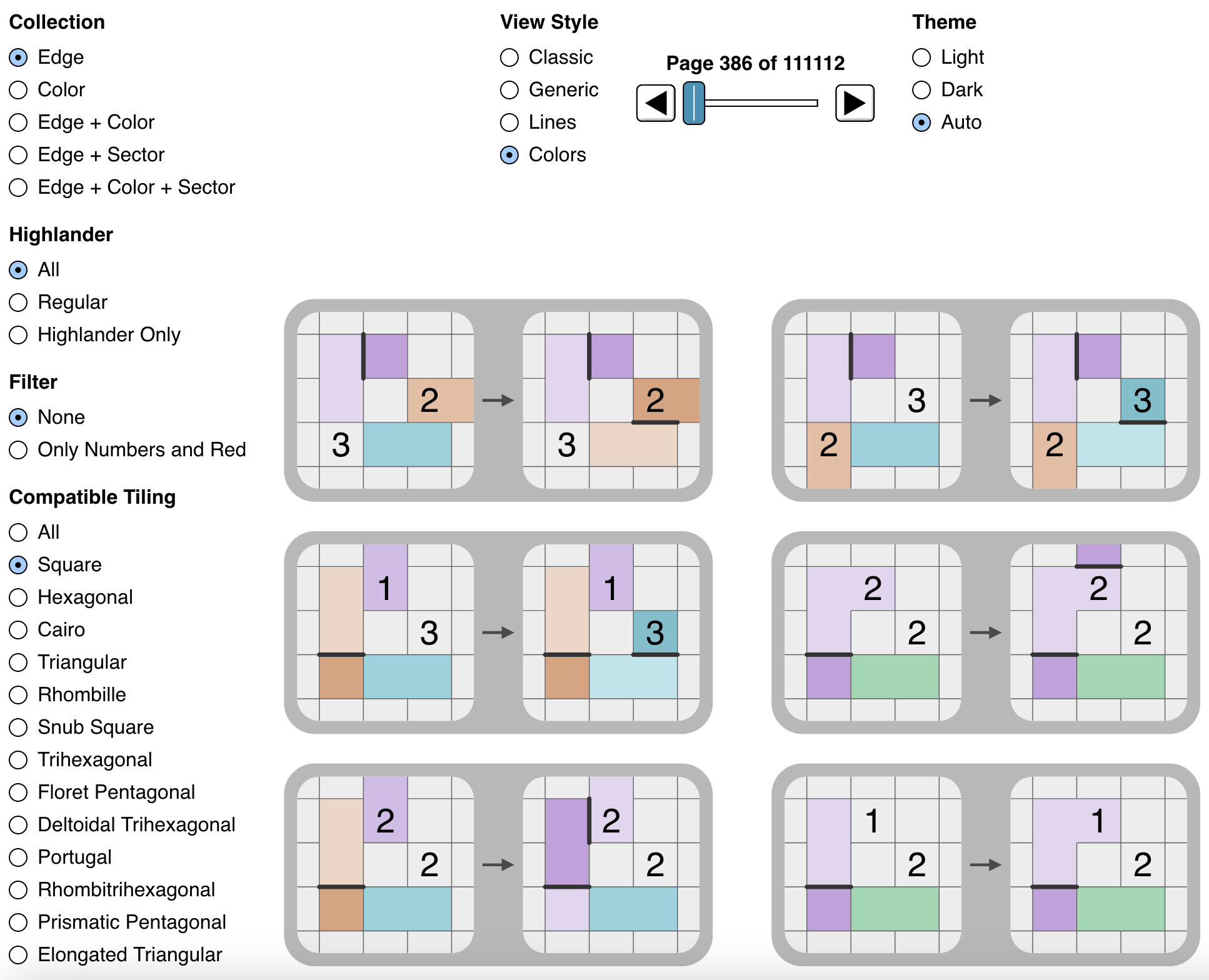
      It is useful to mark sectors (adjacent pairs of potential lines) with a few properties. The most powerful marking
      says that "exactly one of these will be a line, and the other will be an X". We denote this below by drawing a
      red curve between the two potential lines.
    </p>

    <div class="examples">
      <div class="example">
        <div id="only-one-across-two" class="example-div"></div>
        <span class="caption">
          If a pair of edges of a 2 will have exactly one line, then the <em>other</em> pair will <em>also</em> have exactly one line.
        </span>
      </div>
    </div>

    <p>
      On square grids, this property also applies across a dot to the opposite sector:
    </p>

    <div class="examples">
      <div class="example">
        <div id="only-one-crossing" class="example-div"></div>
        <span class="caption">
          If a pair of edges of a 2 will have exactly one line, then the <em>other</em> pair will <em>also</em> have exactly one line.
        </span>
      </div>
    </div>

    <p>
      Thus the only-one sector property will propagate across a chain of diagonally-connected 2s (in a square grid)!
    </p>

    <p>
      This type of parity arises naturally in many common situations:
    </p>

    <div class="examples examples-flex">
      <div class="example">
        <div id="one-incident-sector" class="example-div"></div>
      </div>
      <div class="example">
        <div id="two-incident-sector" class="example-div"></div>
      </div>
      <div class="example">
        <div id="three-incident-sector" class="example-div"></div>
      </div>
      <div class="example">
        <div id="simple-incident-sector" class="example-div"></div>
      </div>
    </div>

    <p>
      It is particularly powerful, not just because it can propagate across 2s, but many of the reverse cases directly
      deduce lines or X's:
    </p>

    <div class="examples examples-flex">
      <div class="example">
        <div id="one-incident-reverse-sector" class="example-div"></div>
      </div>
      <div class="example">
        <div id="two-incident-reverse-sector-a" class="example-div"></div>
      </div>
      <div class="example">
        <div id="two-incident-reverse-sector-b" class="example-div"></div>
      </div>
      <div class="example">
        <div id="three-incident-reverse-sector" class="example-div"></div>
      </div>
      <div class="example">
        <div id="simple-incident-reverse-sector-a" class="example-div"></div>
      </div>
      <div class="example">
        <div id="simple-incident-reverse-sector-b" class="example-div"></div>
      </div>
    </div>

    <p>
      Whenever there is a line or an X in a sector with "only one" line, you can immediately mark the opposite!
    </p>

    <p>
      The only-one sector can solve the following example patterns, but much more:
    </p>


    <div class="examples examples-flex">
      <div class="example">
        <div id="only-one-example-a" class="example-div"></div>
      </div>
      <div class="example">
        <div id="only-one-example-b" class="example-div"></div>
      </div>
      <div class="example">
        <div id="only-one-example-c" class="example-div"></div>
      </div>
    </div>

    <h3>Not One</h3>

    <p>
      A dual to the "only one" sector is the "not one" sector. This is a sector where either both are lines or both are X's.
      We will mark this with two blue curves between the two potential lines.
    </p>

    <div class="examples">
      <div class="example">
        <div id="two-spike-sector" class="example-div"></div>
        <span class="caption">
          This comes up most naturally with 2-in-a-corner pattern. Note that this also includes only-one sectors, and
          can be incredibly constraining. In this case, the upper-left of the 2 ALSO has the not-one sector property, but
          isn't marked visually by the system due to the triviality (only two places for lines).
        </span>
      </div>
    </div>

    <div class="examples">
      <div class="example">
        <div id="not-one-propagation" class="example-div"></div>
        <span class="caption">
          Not-one sectors propagate across dots in square grids.
        </span>
      </div>
    </div>

    <div class="examples">
      <div class="example">
        <div id="two-spike-from-sector" class="example-div"></div>
        <span class="caption">
          Not-one sectors also create the 2-in-a-corner pattern.
        </span>
      </div>
    </div>

    <p>
      Using the above patterns, it follows that any diagonal chain of 2s will propagate the not-one sector property across
      the entire chain!
    </p>

    <h3>Not Two and Not Zero</h3>

    <p>
      Similarly, we can mark sectors when we can rule out two lines or zero lines. We will mark not-two with a single dashed
      orange curve, and not-zero with a double dashed green curve.
    </p>

    <div class="examples">
      <div class="example">
        <div id="one-not-two" class="example-div"></div>
        <span class="caption">
          Not-two sectors naturally form around a 1.
        </span>
      </div>
    </div>

    <div class="examples">
      <div class="example">
        <div id="three-not-zero" class="example-div"></div>
        <span class="caption">
          Not-zero sectors naturally form around a 3.
        </span>
      </div>
    </div>

    <div class="examples">
      <div class="example">
        <div id="not-zero-not-two-propagation" class="example-div"></div>
        <span class="caption">
          If a sector is a not-zero, then any opposite sector is a not-two.
        </span>
      </div>
    </div>

    <h3>Sector Combinations</h3>

    <p>
      When rules overlap and you would mark multiple sectors on a single pair of potential lines, you can combine them into
      more precise states:
    </p>

    <ul>
      <li>
        Not-zero (green) and not-one (blue) => both are lines!
      </li>
      <li>
        Not-two (orange) and not-one (blue) => both are X's!
      </li>
      <li>
        Not-zero (green) and not-two (orange) => only-one (red)
      </li>
    </ul>

    <div class="examples">
      <div class="example">
        <div id="second-diagonal-three" class="example-div"></div>
        <span class="caption">
          This rule can be directly derived from the above sectors rules directly. Each 3 creates not-zero sectors,
          and the not-two sectors propagate across the diagonal. Since each pair of potential lines has not-zero and not-two,
          it is equivalent to only-one. Previous sectors rules show what only-one with a 3 combines into.
        </span>
      </div>
    </div>

    <h3>Common Sector Patterns</h3>

    <div class="examples examples-flex">
      <div class="example">
        <div id="line-not-two" class="example-div"></div>
      </div>
      <div class="example">
        <div id="adjacent-not-one" class="example-div"></div>
      </div>
      <div class="example">
        <div id="not-zero-three-edge" class="example-div"></div>
      </div>
      <div class="example">
        <div id="not-two-double" class="example-div"></div>
      </div>
      <div class="example">
        <div id="adjacent-propagation" class="example-div"></div>
      </div>
      <div class="example">
        <div id="two-partial-sector-a" class="example-div"></div>
      </div>
      <div class="example">
        <div id="two-partial-sector-b" class="example-div"></div>
      </div>
      <div class="example">
        <div id="no-sector-loop" class="example-div"></div>
      </div>
      <div class="example">
        <div id="two-sector-prop-a" class="example-div"></div>
      </div>
      <div class="example">
        <div id="two-sector-prop-b" class="example-div"></div>
      </div>
    </div>

    <h3>Parity</h3>

    <p>
      The following rules are very powerful when combined. They represent the concept of <a href="https://en.wikipedia.org/wiki/Parity_(mathematics)">parity</a>,
      in general the concept of even/odd.
    </p>

    <p>
      Most notably, if all but one sector of a square are marked with only-one or not-one, you can deduce the last sector!
      If you look at any closed region in the puzzle (e.g. a square, but it can be arbitrary), the number of times the
      final loop will cross it <strong>will be even</strong>. Every only-one sector is a "crossing" of our square, and
      every not-one sector is a "non-crossing".
    </p>

    <p>
      For example, in a square:
    </p>

    <ul>
      <li>
        Three only-one sectors => four only-one sectors (last corner is only-one)
      </li>
      <li>
        Three not-one sectors => four not-one sectors (last corner is not-one)
      </li>
      <li>
        Two not-one sectors and one only-one sector => two of each (last corner is only-one)
      </li>
    </ul>

    <p>
      For a concrete case of parity in action, see <a href="https://www.reddit.com/r/slitherlink/comments/18n6w82/comment/ke9rlvn/">this reddit thread</a>.
    </p>

    <div class="examples examples-flex">
      <div class="example">
        <div id="sector-parity-a" class="example-div"></div>
      </div>
      <div class="example">
        <div id="sector-parity-b" class="example-div"></div>
      </div>
      <div class="example">
        <div id="sector-parity-c" class="example-div"></div>
      </div>
      <div class="example">
        <div id="sector-parity-d" class="example-div"></div>
      </div>
      <div class="example">
        <div id="sector-parity-e" class="example-div"></div>
      </div>
    </div>
  </section>

  <section id="alternative-representations">

    <h2>Alternative Representations</h2>

    <p>
      The classic form of dots and X's can be harder to use in a few ways:
    </p>

    <ul>
      <li>
        The implicit "lines between dots" can be hard to visualize multiple pathways (particularly for coloring/Jordan curve
        solving).
      </li>
      <li>
        The implicit "lines between dots" doesn't work as well for non-square grids (harder to visualize the potential shapes).
      </li>
      <li>
        The X's can be awkward on non-square grids (they look weird either rotated or non-rotated).
      </li>
      <li>
        Sectors are not as clear with the implicit lines.
      </li>
    </ul>

    <p>
      For example, the same puzzle is represented below with two methods. The left "arm" of the puzzle (with the 3)
      needs to connect back to the rest with two line paths. There happens to be a "cut" (marked in red) where there are
      only two places for lines to pass through (at each endpoint of the red line). Making the possible paths explicit
      helps identify this type of case.
    </p>

    <div class="examples examples-flex">
      <div class="example">
        <div id="unclear-classic" class="example-div"></div>
      </div>
      <div class="example">
        <div id="unclear-colors" class="example-div"></div>
      </div>
    </div>

    In these other representations, "lines" are drawn with a <em>thick, bold</em> style, "possible lines" are drawn with
    a <em>thin</em> style, and X's are represented simply by the absence of a line.

    <div class="examples">
      <div class="example">
        <div id="unclear-visible-red" class="example-div"></div>
        <span class="caption">
          It is also possible to mark the location of X's with other styles.
        </span>
      </div>
    </div>
  </section>

  <section id="alternative-tilings">

    <h2>Alternative Tilings</h2>

    <p>
      Any <a href="https://en.wikipedia.org/wiki/Planar_graphs">planar graph</a> or tiling can be used to make a puzzle.
    </p>

    <div class="examples examples-flex">
      <div class="example">
        <div id="rhombille-puzzle" class="example-div"></div>
      </div>
      <div class="example">
        <div id="hexagonal-puzzle" class="example-div"></div>
      </div>
      <div class="example">
        <div id="cairo-puzzle" class="example-div"></div>
      </div>
      <div class="example">
        <div id="floret-puzzle" class="example-div"></div>
      </div>
      <div class="example">
        <div id="rhombitrihexagonal-puzzle" class="example-div"></div>
      </div>
    </div>

    <p>
      Each of which has different rules:
    </p>

    <div class="examples examples-flex">
      <div class="example">
        <div id="hex-five-five" class="example-div"></div>
      </div>
      <div class="example">
        <div id="hex-five-four-five" class="example-div"></div>
      </div>
    </div>

    <p>
      However, it is possible to create/compute "general" rules that work across tilings:
    </p>

    <div class="examples examples-flex">
      <div class="example">
        <div id="general-rule-square" class="example-div"></div>
      </div>
      <div class="example">
        <div id="general-rule-rhombille" class="example-div"></div>
      </div>
      <div class="example">
        <div id="general-rule-snub-square" class="example-div"></div>
      </div>
      <div class="example">
        <div id="general-rule-deltoidal-trihexagonal" class="example-div"></div>
      </div>
      <div class="example">
        <div id="general-rule-rhombitrihexagonal" class="example-div"></div>
      </div>
    </div>

    <div class="examples">
      <div class="example">
        <div id="general-rule-generic" class="example-div"></div>
        <span class="caption">
          All of the above rules are represented by this form (will be described later in the technical details, but red circles denote "all other unspecified potential lines get X'ed").
        </span>
      </div>
    </div>
  </section>

  <section id="coloring">

    <h2>Coloring</h2>

    <p>
      Since the loop is a <a href="https://en.wikipedia.org/wiki/Jordan_curve_theorem">Jordan curve</a>, it divides the cells
      into two regions, one inside and one outside. This can be used to deduce lines and X's, or even to solve directly.
    </p>

    <p>
      Coloring is where we mark the deduction "this cell will be in the same/opposite region as this other cell".
    </p>

    <div class="examples">
      <div class="example">
        <div id="solved-puzzle" class="example-div"></div>
        <span class="caption">
          In this solved puzzle, the outside is white, and the inside is gray.
        </span>
      </div>
    </div>

    <p>
      A common way of solving with coloring is to mark colors just for the inside and outside of the loop.
    </p>

    <div class="examples">
      <div class="example">
        <div id="partial-inside-outside-puzzle" class="example-div"></div>
        <span class="caption">
          Inside/outside colors marked (not using general coloring, so lines are highlighted for visibility).
        </span>
      </div>
    </div>

    <p>
      However, this is less helpful on larger puzzles, where we may be able to deduce coloring information in the middle,
      and it is far from any inside/outside coloring.
    </p>

    <p>
      When coloring, conceptually we get pairs of opposing regions (where every cell in the two different regions is of
      opposite color, and every cell in the same region is of the same color).
    </p>

    <p>
      To be able to solve with this information, it helps to use a single color hue for each region pair, but picking
      a lighter color and darker color to indicate the "opposite" regions:
    </p>

    <div class="examples">
      <div class="example">
        <div id="coloring-pairs-puzzle" class="example-div"></div>
        <span class="caption">
          Pairs with a lighter and darker color with the same hue will be on opposite sides of the loop.
          Note how coloring can be disconnected (the upper-right pair of 3's forces the left and right cells to have
          opposite colors), and the only-one sector from the 1 in the bottom right also does the same.
          Note the single-color region in the middle-to-upper-left: if it where white (outside), it would split the
          puzzle into two disconnected regions (the upper left would be isolated), which is not valid. Thus we could mark it
          as being the "inside" color!
        </span>
      </div>
    </div>

    <div class="examples">
      <div class="example">
        <div id="pure-coloring-pairs-puzzle" class="example-div"></div>
        <span class="caption">
          We can also display and solve using <em>only</em> the coloring information.
        </span>
      </div>
    </div>

    <p>
      This user interface tries to make colors as clear as possible (where pairs that are close to each other will have
      different hues).
    </p>

    <p>
      Additionally:
    </p>

    <ul>
      <li>
        Every line will force its adjacent cells to be of opposite colors.
      </li>
      <li>
        Every X will force its adjacent cells to be of the same color.
      </li>
    </ul>

    <p>
      The opposite is also true:
    </p>

    <div class="examples">
      <div class="example">
        <div id="same-face-to-red-edge" class="example-div"></div>
        <span class="caption">
          If two adjacent cells have the same color, they must be separated by an X.
        </span>
      </div>
    </div>

    <div class="examples">
      <div class="example">
        <div id="opposite-face-to-black-edge" class="example-div"></div>
        <span class="caption">
          If two adjacent cells have the opposite color, they must be separated by a line.
        </span>
      </div>
    </div>

    <p>
      We can work within the coloring system with a few fundamental patterns:
    </p>

    <div class="examples">
      <div class="example">
        <div id="color-no-checker" class="example-div"></div>
        <span class="caption">
          Checkerboard-like patterns aren't allowed (i.e. there cannot be four lines on a dot).
        </span>
      </div>
    </div>

    <div class="examples">
      <div class="example">
        <div id="color-no-checker-same" class="example-div"></div>
        <span class="caption">
          Another way checkerboard-like patterns aren't allowed.
        </span>
      </div>
    </div>

    <div class="examples">
      <div class="example">
        <div id="color-two-lines" class="example-div"></div>
        <span class="caption">
          Maximum of two lines per dot.
        </span>
      </div>
    </div>

    <p>
      Many of the usual rules carry over, but some useful ones:
    </p>

    <div class="examples examples-flex">
      <div class="example">
        <div id="color-one-same-a" class="example-div"></div>
      </div>
      <div class="example">
        <div id="color-one-same-b" class="example-div"></div>
      </div>
      <div class="example">
        <div id="color-one-opposite-a" class="example-div"></div>
      </div>
      <div class="example">
        <div id="color-one-opposite-b" class="example-div"></div>
      </div>
      <div class="example">
        <div id="color-two-same-a" class="example-div"></div>
      </div>
      <div class="example">
        <div id="color-two-same-b" class="example-div"></div>
      </div>
      <div class="example">
        <div id="color-two-opposite-a" class="example-div"></div>
      </div>
      <div class="example">
        <div id="color-two-opposite-b" class="example-div"></div>
      </div>
      <div class="example">
        <div id="color-three-same-a" class="example-div"></div>
      </div>
      <div class="example">
        <div id="color-three-same-b" class="example-div"></div>
      </div>
      <div class="example">
        <div id="color-three-opposite-a" class="example-div"></div>
      </div>
      <div class="example">
        <div id="color-three-opposite-b" class="example-div"></div>
      </div>
      <div class="example">
        <div id="color-three-adjacent" class="example-div"></div>
      </div>
      <div class="example">
        <div id="color-no-loop" class="example-div"></div>
      </div>
    </div>
  </section>

  <section id="colors-and-sectors">

    <h2>Colors and Sectors</h2>

    <p>
      Coloring can also directly imply sectors.
    </p>

    <div class="examples">
      <div class="example">
        <div id="color-opposite-to-only-one" class="example-div"></div>
        <span class="caption">
          Opposite colors are <em>equivalent</em> to only-one.
        </span>
      </div>
    </div>

    <div class="examples">
      <div class="example">
        <div id="color-same-to-not-one" class="example-div"></div>
        <span class="caption">
          Same colors are <em>equivalent</em> to not-one.
        </span>
      </div>
    </div>

    <div class="examples">
      <div class="example">
        <div id="only-one-to-color" class="example-div"></div>
        <span class="caption">
          Only-one is <em>equivalent</em> to opposite colors.
        </span>
      </div>
    </div>

    <div class="examples">
      <div class="example">
        <div id="not-one-to-color" class="example-div"></div>
        <span class="caption">
          Not-one is <em>equivalent</em> to same colors.
        </span>
      </div>
    </div>

    <p>
      Both sectors and colors can propagate or be joined across disparate parts of a puzzle, and thus can be very powerful.
    </p>
  </section>

  <section id="highlander">

    <h2>Highlander</h2>

    <p>
      Since valid puzzles must have a single unique solution, we can actually apply additional deductions (generally based on
      which cells are blank). These are called <a href="https://kwontomloop.com/forum.php?a=topic&topic_id=66&pg=2">highlander</a>
      patterns ("there can be only one").
    </p>

    <p>
      The core idea is that if adding a line or an X would result in a pattern that would <em>always</em> allow two solutions
      to exist, then that line or X is <em>wrong</em> (since there is a unique solution), and the opposite must be added.
    </p>

    <p>
      This can be considered to be less <em>pure</em>, since these pattern rules are <strong>incorrect if the puzzle has more than one solution</strong>,
      since they are based on the assumption that there is a unique solution. If used on a puzzle with multiple solutions,
      it can lead to finding <em>no</em> solution! Furthermore, puzzles are logically solvable <em>without</em> using highlander
      deductions.
    </p>

    <p>
      However, highlander deductions can be very powerful, and can be used to solve difficult puzzles quickly. Many people
      rely on it as a key technique.
    </p>

    <p>
      Patterns like this generally rely on certain cells being "blank" (i.e. not having a number), since that allows
      for multiple solutions to exist. For highlander patterns, we will mark cells that <em>can</em> have numbers with
      question marks.
    </p>

    <p>
      The classic example of a highlander rule is the following:
    </p>

    <div class="examples">
      <div class="example">
        <div id="highlander-two" class="example-div"></div>
        <span class="caption">
          If a 2 has all four adjacent cells empty (no numbers), and has the double-X corner that forces it to be one of
          two different configurations, then allowing the upper-left corner of the 2 to have the same double-X would
          create two solutions.
        </span>
      </div>
    </div>

    <p>
      For example:
    </p>

    <div class="examples">
      <div class="example">
        <div id="highlander-puzzle-0" class="example-div"></div>
        <span class="caption">
          Can you find the highlander deduction in this puzzle?
        </span>
      </div>
    </div>

    <div class="examples">
      <div class="example">
        <div id="highlander-puzzle-1" class="example-div"></div>
        <span class="caption">
          If there were X's at the red circles, then the blue and green paths would be interchangeable, creating two solutions
          regardless of the rest of the puzzle (since there is no way for the rest of the puzzle to influence the choice between
          the blue and green path).
        </span>
      </div>
    </div>

    <div class="examples">
      <div class="example">
        <div id="highlander-puzzle-2" class="example-div"></div>
        <span class="caption">
          Thus this highlander deduction is valid if the puzzle has a unique solution.
        </span>
      </div>
    </div>

    <h3>Common Highlander Patterns</h3>

    <p>
      Here is a sampling of common highlander patterns:
    </p>

    <div class="examples examples-flex">
      <div class="example">
        <div id="highlander-a" class="example-div"></div>
      </div>
      <div class="example">
        <div id="highlander-b" class="example-div"></div>
      </div>
      <div class="example">
        <div id="highlander-c" class="example-div"></div>
      </div>
      <div class="example">
        <div id="highlander-d" class="example-div"></div>
      </div>
      <div class="example">
        <div id="highlander-e" class="example-div"></div>
      </div>
      <div class="example">
        <div id="highlander-f" class="example-div"></div>
      </div>
      <div class="example">
        <div id="highlander-g" class="example-div"></div>
      </div>
      <div class="example">
        <div id="highlander-h" class="example-div"></div>
      </div>
      <div class="example">
        <div id="highlander-i" class="example-div"></div>
      </div>
    </div>

    <p>
      Some of these are pretty hard to believe! Of note: they cannot be combined to make larger "combined" highlander rules,
      since they need the exact pattern to match. The <a href="./rule-explorer">pattern explorer</a> can actually list out
      all of the "excluded" solution patterns for each highlander rule (click on it), showing another solution that rules it out.
    </p>

    <p>
      For example, see <a href="./rule?r=square-1-0%2FAQcODxARIib%2FExkbIRwe%2Fw%3D%3D">analysis for the first highlander case</a>,
      or <a href="./rule?r=square-2-2%2FAQIGDg8QES8x%2Fy4hJ%2F8%3D">analysis for the last highlander case</a>.
      Note that the "highlander duplicates" are given in groups (usually pairs), showing which solutions are excluded and why.
    </p>

    <p>
      The most counter-intuitive thing about excluded solutions (that I <em>swear</em> I have verified logically) is that
      it is possible to exclude solutions based on "duplicate" solutions that are not possible with the current state of
      X's and lines! The highlander condition applies to the base puzzle (the numbers and grid), so just because you might
      have deduced some lines and X's doesn't prevent ruling out things using solutions that contradict those deductions.
    </p>
  </section>

  <section id="loops-and-regions">

    <h2>Loops and Regions</h2>

    <p>
      Below is a case (with two representations) where there is a constriction: if certain moves are made, it will split the puzzle into two
      disconnected regions.
    </p>

    <div class="examples">
      <div class="example">
        <div id="loop-region-0" class="example-div"></div>
      </div>
    </div>

    <p>
      <strong>When thinking in terms of lines and X's</strong>: The blue loop goes through only two paths that could have lines.
      The rest have X's. Since the blue loop has lines on the inside and outside, there must be at least 2 lines connecting through it
      so that the puzzle doesn't split into two disconnected loops. Notably, any closed loop that you can draw must have an
      even number of lines through it!
    </p>

    <div class="examples">
      <div class="example">
        <div id="loop-region-0-colors" class="example-div"></div>
      </div>
    </div>

    <p>
      <strong>When thinking in terms of colors</strong>: The blue line goes through only two colors: the outside (white)
      and another color (marked with purple). If the purple-dashed color turns into the outside (white) color, it would cut off
      the region in the blue loop from the rest of the puzzle. Therefore the purple color must be the inside color (gray).
    </p>

    <div class="examples">
      <div class="example">
        <div id="loop-region-1-internal" class="example-div"></div>
      </div>
    </div>

    <p>
      These can also be <em>internal</em>, or with arbitrary colors, as seen above. The interior loop needs to be connected to the outside.
    </p>

    <div class="examples">
      <div class="example">
        <div id="loop-region-2-multiple" class="example-div"></div>
      </div>
    </div>

    <p>
      The two colors can actually alternate back-and-forth, and be present in multiple locations, like the example above.
      Here, both purple-dashed regions are the same color, and for similar reasons they must be the "inside" color (gray).
    </p>
  </section>

  <section id="more-patterns">

    <h2>More Patterns</h2>

    <p>
      There are <strong>many</strong> more patterns for Slitherlink. The above are just a few of the most common ones.
    </p>

    <p class="p-center">
      <a href="./rule-explorer"><img src="/img/rule-explorer.png" style="width: auto; height: auto; max-width: 100%;" alt="Pattern Explorer"></a>
    </p>

    <p>
      I have computed a large number of patterns, and you can browse them in the <a href="./rule-explorer">pattern explorer</a>.
    </p>

    <p>
      Fundamentally, there are 5 different databases of patterns:
    </p>

    <ul>
      <li>Edge (no colors/sectors)</li>
      <li>Color (no edges/sectors)</li>
      <li>Edge + Color (no sectors)</li>
      <li>Edge + Sector (no colors)</li>
      <li>Edge + Color + Sector</li>
    </ul>

    <p style="margin-top: 1em;">
      It also allows filtering by:
    </p>

    <ul>
      <li>Highlander</li>
      <li>Numbers/red (helpful for finding "starting" patterns that don't need lines/colors)</li>
      <li>Compatible Tiling</li>
    </ul>

    <p>
      Clicking on any pattern will take you to a page that displays more information about it, and shows how the pattern
      might work in different tilings.
    </p>
  </section>

  <section id="practice">
    <h2>Practice</h2>

    <p>
      To learn patterns, I would highly recommend using the <a href="./play">interactive app</a>. Generate a puzzle,
      solve all that you can, and when you get stuck, hit the "hint" button.
    </p>

    <p>
      It should show you a new pattern that you missed. This is great for learning new patterns!
    </p>

    <p>
      If you do not understand the pattern, you can click on it to see more details. Try to see if there is a "solution"
      that breaks the pattern (i.e. satisfies all constraints, and has no loops). This can help you understand why the
      pattern is valid.
    </p>

    <p>
      Additionally, please let me know if I can fix or update anything in the app or on this page!
    </p>
  </section>

</main>]]></content><author><name>Jonathan Olson</name></author><category term="article" /><summary type="html"><![CDATA[An opinionated guide on new techniques and strategies for solving Slitherlink puzzles, with a web app to play with the concepts and a library of patterns.]]></summary><media:thumbnail xmlns:media="http://search.yahoo.com/mrss/" url="https://jonathanolson.net/img/slitherlink-dark-pattern.png" /><media:content medium="image" url="https://jonathanolson.net/img/slitherlink-dark-pattern.png" xmlns:media="http://search.yahoo.com/mrss/" /></entry><entry><title type="html">Play Slitherlink</title><link href="https://jonathanolson.net/slitherlink/playceholder" rel="alternate" type="text/html" title="Play Slitherlink" /><published>2024-05-19T00:00:00+00:00</published><updated>2024-05-19T00:00:00+00:00</updated><id>https://jonathanolson.net/slitherlink/play-slitherlink</id><content type="html" xml:base="https://jonathanolson.net/slitherlink/playceholder"><![CDATA[<main>
  This is just a placeholder, it should never be viewed directly!
</main>]]></content><author><name>Jonathan Olson</name></author><category term="project" /><summary type="html"><![CDATA[Try out Slitherlink puzzles and challenge yourself with various techniques and strategies.]]></summary><media:thumbnail xmlns:media="http://search.yahoo.com/mrss/" url="https://jonathanolson.net/img/slitherlink.jpg" /><media:content medium="image" url="https://jonathanolson.net/img/slitherlink.jpg" xmlns:media="http://search.yahoo.com/mrss/" /></entry><entry><title type="html">Alpenglow</title><link href="https://jonathanolson.net/alpenglow/playceholder" rel="alternate" type="text/html" title="Alpenglow" /><published>2024-02-11T00:00:00+00:00</published><updated>2024-02-11T00:00:00+00:00</updated><id>https://jonathanolson.net/alpenglow/alpenglow</id><content type="html" xml:base="https://jonathanolson.net/alpenglow/playceholder"><![CDATA[<!--<link href="/css/alpenglow.css" rel="stylesheet">-->
<aside class="sidebar sidebar-left">
  <div class="sticky-content">
		<nav>
      <div>Contents</div>
      <ul>
        <li><a href="#contents-here">Contents Here</a></li>
			</ul>
		</nav>
  </div>
</aside>
<aside class="sidebar sidebar-right">
  <div class="sticky-content">
    <div>Related</div>
    <ul>
      <li><a href="https://phetsims.github.io/alpenglow/">Alpenglow Project</a></li>
      <li><a href="https://github.com/phetsims/alpenglow">Alpenglow GitHub</a></li>
    </ul>
  </div>
</aside>
<main>
  <p>
    <a href="https://phetsims.github.io/alpenglow/">Alpenglow</a> is an experimental rasterizer that takes a scene
    description and efficiently produces a corresponding high-quality image.
  </p>

  <p style="color: red;">
    TODO: arrow showing transform between vector description and optimized description!
  </p>

  <section id="goals">
    <h2>Goals</h2>

    <ul>
      <li>
        No <a href="https://phetsims.github.io/alpenglow/#overview-conflation">conflation artifacts</a>
      </li>
      <li>
        Proper antialiasing with filters
      </li>
      <li>
        Correct gamma blending of colors
      </li>
      <li>

      </li>
    </ul>
  </section>
</main>]]></content><author><name>Jonathan Olson</name></author><category term="project" /><summary type="html"><![CDATA[Alpenglow is an experimental rasterizer that takes a scene description and efficiently produces a corresponding high-quality image.]]></summary><media:thumbnail xmlns:media="http://search.yahoo.com/mrss/" url="https://jonathanolson.net/img/alpenglow-demo-square.png" /><media:content medium="image" url="https://jonathanolson.net/img/alpenglow-demo-square.png" xmlns:media="http://search.yahoo.com/mrss/" /></entry><entry><title type="html">Optimal Wordle Solutions</title><link href="https://jonathanolson.net/experiments/optimal-wordle-solutions" rel="alternate" type="text/html" title="Optimal Wordle Solutions" /><published>2022-01-17T00:00:00+00:00</published><updated>2022-01-17T00:00:00+00:00</updated><id>https://jonathanolson.net/experiments/optimal-wordle-solutions</id><content type="html" xml:base="https://jonathanolson.net/experiments/optimal-wordle-solutions"><![CDATA[<link href="/css/wordle-solver.css" rel="stylesheet">
<aside class="sidebar sidebar-left">
  <div class="sticky-content">
		<nav>
      <div>Contents</div>
      <ul>
        <li><a href="#decision-trees-and-metrics">Decision Trees and Metrics</a></li>
        <li><a href="#deep-vs-shallow-solutions">Deep vs. Shallow Solutions</a></li>
        <li><a href="#results">Results</a></li>
        <li><a href="#code-and-computations">Code and Computations</a></li>
      </ul>
		</nav>
  </div>
</aside>
<main>
  <p>
    The game <a href="https://www.powerlanguage.co.uk/wordle/">Wordle</a> has a lot of speculation online about what is
    the "best" first word.

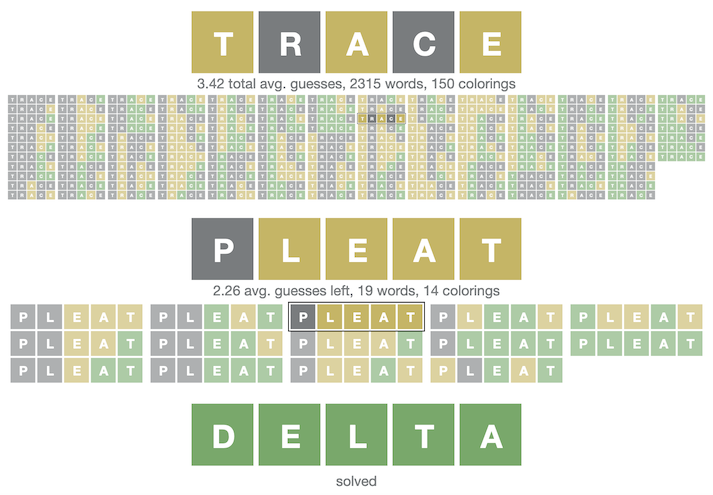
    If we are exploring <strong>optimal</strong> strategies to solve the original game in the least number of guesses, <strong>most of it is wrong</strong>.
  </p>
  <p>
    For humans, almost all of these words are great! However for optimal strategies, we need to examine all of the guesses,
    not just the first word. It turns out, it's possible to <strong>solve 99% of all puzzles in only 4 guesses</strong> or
    <strong>with an average of ~3.42 guesses per win</strong>,
    but not with most of the "best" words found online.
  </p>
  <p style="text-align: center; font-weight: bold;">
    Try out my <a href="https://jonathanolson.net/wordle-solver/">solver with the best strategies</a> that have been found so far.
  </p>
  <p style="text-align: center;">
    <a href="https://jonathanolson.net/wordle-solver/"><img src="../img/wordle-solver-large.png" width="356.5" heght="247.5"></a>
  </p>
  <p>
    It's important to note that Wordle has a specific set of "target" words (that could be the daily word in a puzzle),
    and a much larger set of "guessable" words (that you can use to guess, but will never be the daily word). All of this
    is specific to the exact word lists that Wordle currently uses.
  </p>

  <section id="decision-trees-and-metrics">
    <h2>Decision Trees and Metrics</h2>
    <p>
      Each (non-stochastic) strategy can be represented by a
      <a href="https://en.wikipedia.org/wiki/Decision_tree">decision tree</a>, where there is a single initial guess, and
      each possible resulting coloring (grey/yellow/green) in the game will also be paired with a second guess, and so on.
      The entire game is mapped out. <a href="https://jonathanolson.net/wordle-solver/">My best "strategies" so far</a> are
      hopefully a good example.
    </p>
    <p>
      For whatever metric we are judging strategies by, there will be one or more "best" strategies. There are a few metrics
      that I've used. After seeing most words solvable in less than 5 guesses, my initial metric was "words that can be
      solved in 4 or fewer guesses", with a goal of all words being solvable that way. I have not run into this case
      (18 words short!!), and I'm in progress
      <a href="https://github.com/jonathanolson/wordle-solver/blob/master/server/scanGuess.js">computationally verifying</a>
      that this is not possible (the heuristically best third of all words have been exhaustively checked).
      I've switched to minimizing the metric "average guesses per win".
    </p>
  </section>

  <section id="deep-vs-shallow-solutions">
    <h2>Deep vs. Shallow Solutions</h2>
    <p>
      Most of the "best" words discussed online have been computed by examining the effects/eliminations/entropy of just the
      first guess, however this can actually result in non-optimal strategies!
    </p>
    <p>
      For any list of target and a guessable word, we can partition the target words into distinct sets by
      determining what colors they would get for a given guess. For example, if our guess is TRACE, we will have one set
      of words where the first letter is gray and the rest are green (BRACE, GRACE). We tend to gain a lot of information
      when most of these sets are small, and I've based search heuristics off of a combination of the size of the largest
      set and the average size of sets.
    </p>
    <p>
      This lets us see what guesses give us the most information at that stage, <strong>however, the best guess at this
      stage may result in some sets that are more difficult to solve</strong>.
    </p>
    <p>
      This is solvable by recursively exploring the space of all possible strategies, to see which ones have the highest
      values for a given metric. Using the heuristics above (based on how the partitioned sets are sized), tree searches
      have found <a href="https://jonathanolson.net/wordle-solver/">more optimized strategies with different starting words</a>.
    </p>
  </section>

  <section id="results">
    <h2>Results</h2>
    <p>
      The best strategy I've found for the metric of "most 4-guess words" starts with RANCE (99.22%, missing just 18 words),
      with RANTS/RATED/RONTE/ALTER close by.
      The best for "fewest average guesses" is currently SALET (3.42117), with REAST/CRATE/TRACE/SLATE close by.
    </p>
    <p>
      All of these examples are available at <a href="https://jonathanolson.net/wordle-solver/">https://jonathanolson.net/wordle-solver/</a>.
    </p>
  </section>

  <section id="code-and-computations">
    <h2>Code and Computations</h2>
    <p>
      The <a href="https://github.com/jonathanolson/wordle-solver">code I've used to run these searches</a> is available.
      It's in a rough state right now, however I'll likely refine it in the upcoming weeks.
      The <a href="https://github.com/jonathanolson/wordle-solver/blob/master/server/wordleCompute.js">tree search logic</a>
      has two types of nodes, since we need one to store different guesses for the same set of words (ComputationNode), and
      one that has a map of all possible scores given a guess (GuessNode). I'm able to compute and serialize these trees
      (currently at 6GB of data on disk), and then efficiently compute optimized strategies given different metrics
      (createTree).
    </p>
    <p>
      I've used <a href="https://github.com/jonathanolson/wordle-solver/blob/master/server/scanGuess.js">scanning for 4-guess strategies</a>,
      using a separate optimized section of code that isn't constructing a persistent tree. It doesn't look possible to have
      a strategy that can always solve Wordle puzzles in only 4 guesses every time.
    </p>
  </section>
</main>]]></content><author><name>Jonathan Olson</name></author><category term="project" /><summary type="html"><![CDATA[Explore decision trees with optimal strategies for the game Wordle.]]></summary><media:thumbnail xmlns:media="http://search.yahoo.com/mrss/" url="https://jonathanolson.net/img/wordle-solver.png" /><media:content medium="image" url="https://jonathanolson.net/img/wordle-solver.png" xmlns:media="http://search.yahoo.com/mrss/" /></entry><entry><title type="html">Shaping</title><link href="https://jonathanolson.net/projects/shaping" rel="alternate" type="text/html" title="Shaping" /><published>2015-11-13T00:00:00+00:00</published><updated>2015-11-13T00:00:00+00:00</updated><id>https://jonathanolson.net/projects/shaping</id><content type="html" xml:base="https://jonathanolson.net/projects/shaping"><![CDATA[<link href="/css/shaping.css" rel="stylesheet">
<main>
  <p>
    Browsers have <strong>not</strong> been great at providing accurate text metrics and shaping to the JS layer.
    This has improved over the years, with <a href="https://developer.mozilla.org/en-US/docs/Web/API/TextMetrics/actualBoundingBoxLeft">actual bounding boxes</a>,
    but <a href="https://developer.mozilla.org/en-US/docs/Web/API/Local_Font_Access_API">access to actual glyph paths</a>
    is still behind a scary prompt to the user.
  </p>

  <p>
    In 2015, I explored how practical it was to ship subsetted fonts to the browser, and use
    <a href="http://www.freetype.org/">FreeType</a>/<a href="http://www.freedesktop.org/wiki/Software/HarfBuzz/">Harfbuzz</a>/<a href="http://fribidi.org/">FriBidi</a> through <a href="https://github.com/kripken/emscripten">Emscripten</a> to render text accurately.
    The result is the <a href="https://github.com/jonathanolson/shaping">Shaping</a> library, which can be used to render text with accurate metrics and shaping.
    It also provides bi-directional text support, which is a must for Arabic and Hebrew, and my particular needs at the time
    (bi-directional embeddings).
  </p>

  <p>
    It uses FreeType to extract glyphs and font information, Harfbuzz for the shaping and complex layout, and FriBidi for bi-directional text support.
  </p>

  <h2>
    Demo
  </h2>
  <p>
    Change the input text below. It will be rendered in SVG (inspect element to grab the SVG path data if desired).
    For general debugging purposes, the logical and visual order of text is displayed (showing each unicode code point
    individually).
  </p>
  <div class="sect">Input</div>
  <div>
    <input class="text-input" id="firstText" type="text" autocomplete="off" value="He said &ldquo;&#x202b;قالت '&#x202a;they said: &#x202b;אתה אמר&#x202c;&#x202c;' حول النص ثنائي الاتجاه&#x202c;&rdquo;"></input>
    <label for="ltrBox">
      <input autocomplete="off" type="radio" name="directionChoice" id="ltrBox" checked>LTR</input>
    </label>
    <label for="rtlBox">
      <input autocomplete="off" type="radio" name="directionChoice" id="rtlBox">RTL</input>
    </label>
  </div>
  <div class="sect">SVG Output</div>
  <svg id="svg" width="200" height="5" class="ltr">
      <path id="path" d="M10 10 H 90 V 90 H 10 Z" fill="black" stroke="transparent"/>
  </svg>
  <div class="sect">Logical Order</div>
  <div id="logical">
  </div>
  <div class="sect">Visual Order and Embedding Levels</div>
  <div id="visual">
  </div>
  <div class="sect">Font</div>
  <p>
    <a href="http://www.google.com/get/noto/#/family/noto-serif">Noto Serif</a>,
    <a href="http://www.google.com/get/noto/#/family/noto-naskh-arab">Noto Naskh Arabic</a>, and
    <a href="http://www.google.com/get/noto/#/family/noto-sans-hebr">Noto Sans Hebrew</a> are currently
    embedded. To replace or install fonts for certain scripts, upload a file:
  </p>
  Default: <input type="file" id="default-font-file"><br>
  Arabic: <input type="file" id="arabic-font-file"><br>
  Hebrew: <input type="file" id="hebrew-font-file"><br>

  <script type="text/javascript" src="/js/phet-lib-2024-02-19.min.js"></script>
  <script type="text/javascript" src="/js/shaping/punycode.min.js"></script>
  <script type="text/javascript" src="/js/shaping/shaping.min.js"></script>
  <script type="text/javascript" src="/fonts/notoNaskhArabicRegularBase64.js"></script>
  <script type="text/javascript" src="/fonts/notoSerifRegularBase64.js"></script>
  <script type="text/javascript" src="/fonts/notoSansHebrewRegularBase64.js"></script>
  <script type="text/javascript" src="/js/shaping/bidi-test.js"></script>
</main>]]></content><author><name>Jonathan Olson</name></author><category term="project" /><summary type="html"><![CDATA[Text shaping (and font parsing) in the browser, with bi-directional shaping support.]]></summary><media:thumbnail xmlns:media="http://search.yahoo.com/mrss/" url="https://jonathanolson.net/img/shaping.jpg" /><media:content medium="image" url="https://jonathanolson.net/img/shaping.jpg" xmlns:media="http://search.yahoo.com/mrss/" /></entry><entry><title type="html">Browser-specific content using Canvas quirks</title><link href="https://jonathanolson.net/experiments/browser-specific-content-using-canvas-quirks" rel="alternate" type="text/html" title="Browser-specific content using Canvas quirks" /><published>2014-07-22T00:00:00+00:00</published><updated>2014-07-22T00:00:00+00:00</updated><id>https://jonathanolson.net/experiments/browser-specific-content-using-canvas-quirks</id><content type="html" xml:base="https://jonathanolson.net/experiments/browser-specific-content-using-canvas-quirks"><![CDATA[<style type="text/css">
  canvas {
    vertical-align: middle;
    border: 1px solid black;
    display: inline;
    margin-right: 10px;
    margin-top: 5px;
    margin-bottom: 5px;
  }

  #mainCanvas, #artCanvas {
    margin: 0 auto;
    display: block;
  }

  .aboveCanvas {
    text-align: center;
    font-weight: bold;
    font-size: 125%;
    margin-top: 20px;
  }
</style>

<script src="/js/canvas-diff/paint-tests.js" type="text/javascript"></script>
<script src="/js/canvas-diff/quirk-art.js" type="text/javascript"></script>

<main>
  <p>
    The Canvas below is painted by using Canvas quirks (differences in browser implementations, not whether a feature
    is implemented). Each quirk is combined with browser-specific content to be rendered (just text below). They are all
    drawn, but Canvas blend modes are used so that only the content for your specific browser is displayed.
  </p>

  <p>
    No browser detection is done, and the Canvases we paint to are never read.
  </p>

  <p class="aboveCanvas">
    Your browser's Canvas quirks seem to match:
  </p>

  <canvas id="mainCanvas">
    Canvas not supported
  </canvas>

  <p class="aboveCanvas">
    And here's some art using quirks, unique to Canvas implementations:
  </p>

  <canvas id="artCanvas" width="256" height="256">
    Canvas not supported
  </canvas>

  <h2 style="margin-top: 20px;">
    <a href="/notes/canvas-browser-specific-quirks">Quirks Available</a>
  </h2>

  <p>
    The following is a list of quirks that can be used for detection (currently we only check a subset) and whether they
    are present. They are cropped versions of a single draw call (stroke or fill) for a path. For details, please see
    a list of <a href="/notes/canvas-browser-specific-quirks">all quirks with code</a>.
  </p>

  <p>
    This works for all tested current browsers as of July 21st, 2014. When I have time available, I'll be submitting
    bug reports for these (hopefully they will be all fixed one day!)
  </p>

  <div id="quirkContainer"></div>

  <p>
    All of the logic for handling quirks and conditional painting is contained in <a href="/js/canvas-diff/paint-tests.js">paint-tests.js</a>.
  </p>

  <script type="text/javascript">
    var quirkContainer = document.getElementById( 'quirkContainer' );

    var mainCanvas = document.getElementById( 'mainCanvas' );
    mainCanvas.width = 600;
    mainCanvas.height = 80;
    var mainContext = mainCanvas.getContext( '2d' );

    function paintText( matcher, text ) {
      matcher.paintIfMatches( mainCanvas, mainContext, function( canvas, context ) {
        context.fillStyle = '#000';
        context.font = '30px Helvetica, Helvetica Neue, Arial, sans-serif';
        context.fillText( text, ( mainCanvas.width - context.measureText( text ).width ) / 2, 50 );
      } );
    }

    paintText( matchers.ChromeBlink,  'Chrome or Blink-based (e.g. Opera)' );
    paintText( matchers.ChromeWebKit, 'Chrome or Chromium/WebKit-based' );
    paintText( matchers.IE9,          'IE9' );
    paintText( matchers.IE10Plus,     'IE10+' );
    paintText( matchers.FFLinux,      'Firefox, probably on Linux' );
    paintText( matchers.FFWinAndroid, 'Firefox, on Windows or Android' );
    paintText( matchers.FFOSX,        'Firefox, on Mac OS X' );
    paintText( matchers.Safari7Plus,  'Safari 7+ (OS X or iOS) or Chrome-iOS' );
    paintText( matchers.Safari6Minus, 'Safari 6.x or OS X <= 10.8' );

    var paintExplanations = {
      a3pi1piarc: 'Opera ~12',
      a2pim1piarc: 'Chrome ~30 (non-iOS), Opera ~17',
      a4pim4piarc: 'NOT IE or Opera ~12',
      zeroLengthLineJoin: 'NOT FF Win7',
      offZeroLineJoin: 'IE',
      forwardAndBackQuadratic: 'NOT iOS/OSX Safari/FF or Chrome iOS',
      cubicCusp: 'IE, FF Linux/Win7',
      cubic4round: 'iOS/OSX Safari, OSX/Linux/Win7 FF, Chrome iOS',
      cubic4square: 'iOS/OSX Safari/FF, Chrome iOS, FF Win7',
      cubic4squareCorner: 'iOS/OSX Safari/FF, Chrome iOS',
      cubic8leftButt: 'IE, Linux/Win7 FF, OS X <=10.8 Safari/FF',
      cubic8leftSquare: 'NOT OS X <=10.8 Safari/FF',
      cubic10lowerRightButt: 'IE, Linux/Win7 FF',
      cubic10topSquare: 'NOT older WebKit (Chrome <=~26, Safari 6, Android Stock/Dolphin 11',
      cubic10topButt: 'IE, FF Win7',
      miterLinesRight: 'NOT FF Win/Android',
      miterLinesUpperLeft: 'FF Linux',
      arcSubpathPoints: 'IE9, FF'
    };

    // if not original
    var paintLinks = {
      cubic4round: 'cubic4',
      cubic4square: 'cubic4',
      cubic4squareCorner: 'cubic4',
      cubic8leftButt: 'cubic8',
      cubic8leftSquare: 'cubic8',
      cubic10lowerRightButt: 'cubic10',
      cubic10topSquare: 'cubic10',
      cubic10topButt: 'cubic10',
      miterLinesRight: 'miterLines',
      miterLinesUpperLeft: 'miterLines',
      arcSubpathPoints: ''
    };

    for ( var key in paintTests ) {
      var canvas = document.createElement( 'canvas' );
      canvas.width = 1;
      canvas.height = 1;
      canvas.style.width = '16px';
      canvas.style.height = '16px';

      var context = canvas.getContext( '2d' );

      paintTests[key]( context, '#000' );

      quirkContainer.appendChild( canvas );

      quirkContainer.appendChild( document.createTextNode( paintExplanations[key] + ' (' ) );
      var anchor = document.createElement( 'a' );
      anchor.href = '/notes/canvas-browser-specific-quirks#quirk-' + ( paintLinks[key] || key );
      anchor.appendChild( document.createTextNode( key ) );
      quirkContainer.appendChild( anchor );
      quirkContainer.appendChild( document.createTextNode( ')' ) );
      quirkContainer.appendChild( document.createElement( 'br' ) );
    }

    var artCanvas = document.getElementById( 'artCanvas' );
    var artContext = artCanvas.getContext( '2d' );

    quirkArt( artCanvas, artContext );

    // (function(){
    //   var ctx = artContext;

    //   var width = artCanvas.width;
    //   var height = artCanvas.height;

    //   ctx.fillStyle = '#000';
    //   ctx.fillRect( 0, 0, width, height );

    //   // Older Opera (12)
    //   ctx.beginPath();
    //   ctx.arc( 0, 0, 1000, 3 * Math.PI, Math.PI, false );
    //   ctx.fillStyle = '#fff';
    //   ctx.fill();

    //   // Older Chrome, Opera
    //   ctx.beginPath();
    //   ctx.arc( width / 2, height, width / 2, 2 * Math.PI, -Math.PI, false );
    //   ctx.fillStyle = 'rgba(255,0,0,0.8)';
    //   ctx.fill();

    //   // OSX / iOS (excluding Chrome desktop)
    //   ctx.beginPath();
    //   ctx.moveTo( width + 100, height / 2 );
    //   ctx.quadraticCurveTo( width - 20, height / 2, width, height / 2 );
    //   ctx.lineWidth = height;
    //   ctx.strokeStyle = 'rgba(255,0,0,0.7)';
    //   ctx.stroke();

    //   // Not if IE, Older Opera
    //   ctx.beginPath();
    //   ctx.arc( 0, 0, width, 4 * Math.PI, -4 * Math.PI, false );
    //   ctx.fillStyle = 'rgba(0,100,255,0.8)';
    //   ctx.fill();
    //   ctx.beginPath();
    //   ctx.arc( 0, 0, width * 0.8, 4 * Math.PI, -4 * Math.PI, false );
    //   ctx.fillStyle = 'rgba(0,0,0,0.5)';
    //   ctx.fill();

    //   // IE
    //   ctx.beginPath();
    //   ctx.moveTo( -1000, -300 );
    //   ctx.lineTo( -300.001, -300 );
    //   ctx.lineTo( -300, -300.001 );
    //   ctx.lineTo( -300, -1000 );
    //   ctx.lineWidth = 800;
    //   ctx.strokeStyle = 'rgba(255,255,255,0.9)';
    //   ctx.stroke();

    //   // IE, some firefox
    //   ctx.beginPath();
    //   ctx.moveTo( width / 2 - 160, -40 + width );
    //   ctx.quadraticCurveTo( width / 2, 20 + width, width / 2, 0 + width );
    //   ctx.lineCap = 'butt';
    //   ctx.lineWidth = 300;
    //   ctx.strokeStyle = 'rgba(255,0,255,0.5)';
    //   ctx.stroke();

    //   // IE, some firefox
    //   ctx.save();
    //   ctx.beginPath();
    //   ctx.translate( 24, 24 );
    //   ctx.moveTo( width / 2, height / 2 );
    //   ctx.bezierCurveTo( 1 + width / 2, height / 2, width / 2, 1 + height / 2, 1 + width / 2, 1 + height / 2 );
    //   ctx.lineCap = 'butt';
    //   ctx.lineWidth = 300;
    //   ctx.strokeStyle = 'rgba(0,50,255,0.5)';
    //   ctx.stroke();
    //   ctx.restore()

    //   // cubic4
    //   ctx.save();
    //   ctx.beginPath();

    //   ctx.save();
    //   ctx.translate( width / 3, height / 3 );
    //   ctx.moveTo( 0, 0 );
    //   var smallNumber = 0.0000000001;
    //   ctx.bezierCurveTo( smallNumber, smallNumber, smallNumber, smallNumber, smallNumber, smallNumber );
    //   ctx.restore();

    //   ctx.lineCap = 'square';
    //   ctx.lineWidth = width / 2;
    //   ctx.strokeStyle = 'rgba(0,0,0,0.5)';
    //   ctx.stroke();
    //   ctx.restore();


    //   //cubic 8
    //   ctx.save();
    //   ctx.beginPath();

    //   ctx.save();
    //   ctx.translate( 24, 24 );
    //   ctx.moveTo( 0, 0 );
    //   ctx.bezierCurveTo( -1, 0, 1, 0, 0, 0.1 );
    //   ctx.restore();

    //   ctx.lineCap = 'butt';
    //   ctx.lineWidth = 40;
    //   ctx.strokeStyle = 'rgba(255,200,150,0.5)';
    //   ctx.globalCompositeOperation = 'lighter';
    //   ctx.stroke();
    //   ctx.globalCompositeOperation = 'source-over';
    //   ctx.restore();

    //   // zigs
    //   function zig( context, x, y, count, height, space, offset ) {
    //     var i;
    //     context.save();
    //     context.beginPath();
    //     context.translate( x, y );
    //     context.moveTo( 0, 0 );
    //     for ( i = 0; i < count; i++ ) {
    //       context.lineTo( space * ( i - 0.5 ), height );
    //       context.lineTo( space * i, 0 );
    //     }
    //     for ( i = count - 1; i >= 0; i-- ) {
    //       context.lineTo( space * i, offset );
    //       context.lineTo( space * ( i - 0.5 ), height + offset );
    //     }
    //     context.fill();
    //     context.restore();
    //   }
    //   ctx.save();
    //   ctx.scale( 1, 2 );
    //   // ctx.translate( width / 8, height / 2 );
    //   ctx.globalCompositeOperation = 'lighter';
    //   ctx.fillStyle = 'rgba(255,100,100,0.7)';
    //   zig( ctx, 50, 0, 10, 100, 1, 10 );
    //   zig( ctx, 60, 0, 10, 100, 1, 5 );
    //   zig( ctx, 70, 0, 10, 100, 2, 5 );
    //   zig( ctx, 90, 0, 10, 50, 2, 5 );
    //   // zig( ctx, 110, 0, 10, 100, 2.5, 10 );
    //   // zig( ctx, 135, 0, 10, 100, 2.5, 10 );
    //   ctx.restore();
    //   ctx.save();

    //   ctx.translate( 0, height * 0.6 );
    //   ctx.fillStyle = 'rgba(255,0,255,1)';
    //   ctx.globalCompositeOperation = 'source-over';
    //   zig( ctx, 0, 0, 130, 100, Math.PI, 10 );
    //   ctx.restore();

    //   (function(){
    //     ctx.save();

    //     var x = 5;
    //     var y = 20;
    //     var w = 50;
    //     var h = 20;
    //     var r = 50;

    //     ctx.lineWidth = 10;

    //     ctx.beginPath();
    //     ctx.translate( width, 0 );

    //     ctx.moveTo(x + r, y);
    //     ctx.arcTo(x + w, y, x + w, y + r, r);
    //     ctx.arcTo(x + w, y + h, x + w - r, y + h, r);
    //     ctx.arcTo(x, y + h, x, y + h - r, r);
    //     ctx.arcTo(x, y, x + r, y, r);

    //     ctx.strokeStyle = 'rgba(255,255,255,0.8)';
    //     ctx.lineWidth = width / 30;
    //     ctx.stroke();

    //     ctx.restore();
    //   })();
    // })();

  </script>
</main>]]></content><author><name>Jonathan Olson</name></author><category term="article" /><summary type="html"><![CDATA[Using edge cases in Canvas implementations, it is possible to create images that are different on different browsers, without querying the browser. This can be used to create browser-specific content.]]></summary><media:thumbnail xmlns:media="http://search.yahoo.com/mrss/" url="https://jonathanolson.net/img/canvas-quirk-static.png" /><media:content medium="image" url="https://jonathanolson.net/img/canvas-quirk-static.png" xmlns:media="http://search.yahoo.com/mrss/" /></entry><entry><title type="html">Canvas Browser-Specific Quirks</title><link href="https://jonathanolson.net/notes/canvas-browser-specific-quirks" rel="alternate" type="text/html" title="Canvas Browser-Specific Quirks" /><published>2014-07-21T00:00:00+00:00</published><updated>2014-07-21T00:00:00+00:00</updated><id>https://jonathanolson.net/notes/canvas-browser-specific-quirks</id><content type="html" xml:base="https://jonathanolson.net/notes/canvas-browser-specific-quirks"><![CDATA[<style type="text/css">
  .snapshot {
    border: 1px solid black;
    margin-right: 10px;
    margin-bottom: 10px;
  }

  .snapshot-container {
    display: inline;
    position: relative;
    left: 0;
    top: 0;
  }

  .snapshot-container.current {
    margin-right: 20px;
    display: block;
  }

  .snapshot-container.current:before {
    font-size: 16px;
    content: "Your browser";
    display: block;
    position: relative;
    left: 0;
    top: 0;
  }

  .snapshot-container.current:after {
    font-size: 16px;
    content: "All browsers (tap or hover over thumbnails for details)";
    display: block;
    position: relative;
    left: 0;
    top: 0;
  }

  .poptip {
    display: inline;
    position: relative !important;
  }
  .poptip:hover, .poptip.hover {
    text-decoration: none;
  }
  .poptip:hover:after, .poptip.hover:after {
    background: #111;
    background: rgba(0,0,0,.8);
    border-radius: 5px;
    top: 30px;
    color: #fff;
    content: attr(data-browser-name);
    display: block;
    left: 0;
    padding: 5px 15px;
    position: absolute;
    /*width: 500px;*/
    white-space: pre;
    z-index: 1000;
    font-size: 12px !important; /* bootstrap */
    line-height: 16px !important; /* bootstrap */
  }
  /*.current .poptip:hover:after {
    content: attr(data-diff-name);
  }*/
</style>

<script src="/js/canvas-diff/exemplar-data.js" type="text/javascript"></script>
<script src="/js/canvas-diff/canvas-diff.js" type="text/javascript"></script>
<script src="/js/canvas-diff/tests.js" type="text/javascript"></script>

<main>

  <!-- code to have Pygments highlight -->
  <div id="a3pi1piarc" style="display: none;">
<figure class="highlight"><pre><code class="language-javascript" data-lang="javascript"><span class="nx">context</span><span class="p">.</span><span class="nx">beginPath</span><span class="p">();</span>
<span class="nx">context</span><span class="p">.</span><span class="nx">arc</span><span class="p">(</span> <span class="mi">16</span><span class="p">,</span> <span class="mi">16</span><span class="p">,</span> <span class="mi">14</span><span class="p">,</span> <span class="mi">3</span> <span class="o">*</span> <span class="nb">Math</span><span class="p">.</span><span class="nx">PI</span><span class="p">,</span> <span class="mi">1</span> <span class="o">*</span> <span class="nb">Math</span><span class="p">.</span><span class="nx">PI</span><span class="p">,</span> <span class="kc">false</span> <span class="p">);</span>
<span class="nx">context</span><span class="p">.</span><span class="nx">fillStyle</span> <span class="o">=</span> <span class="dl">'</span><span class="s1">#000000</span><span class="dl">'</span><span class="p">;</span>
<span class="nx">context</span><span class="p">.</span><span class="nx">fill</span><span class="p">();</span></code></pre></figure>
  </div>

  <div id="a2pim1piarc" style="display: none;">
<figure class="highlight"><pre><code class="language-javascript" data-lang="javascript"><span class="nx">context</span><span class="p">.</span><span class="nx">beginPath</span><span class="p">();</span>
<span class="nx">context</span><span class="p">.</span><span class="nx">arc</span><span class="p">(</span> <span class="mi">16</span><span class="p">,</span> <span class="mi">16</span><span class="p">,</span> <span class="mi">14</span><span class="p">,</span> <span class="mi">2</span> <span class="o">*</span> <span class="nb">Math</span><span class="p">.</span><span class="nx">PI</span><span class="p">,</span> <span class="o">-</span><span class="mi">1</span> <span class="o">*</span> <span class="nb">Math</span><span class="p">.</span><span class="nx">PI</span><span class="p">,</span> <span class="kc">false</span> <span class="p">);</span>
<span class="nx">context</span><span class="p">.</span><span class="nx">fillStyle</span> <span class="o">=</span> <span class="dl">'</span><span class="s1">#000000</span><span class="dl">'</span><span class="p">;</span>
<span class="nx">context</span><span class="p">.</span><span class="nx">fill</span><span class="p">();</span></code></pre></figure>
  </div>

  <div id="a4pim4piarc" style="display: none;">
<figure class="highlight"><pre><code class="language-javascript" data-lang="javascript"><span class="nx">context</span><span class="p">.</span><span class="nx">beginPath</span><span class="p">();</span>
<span class="nx">context</span><span class="p">.</span><span class="nx">arc</span><span class="p">(</span> <span class="mi">16</span><span class="p">,</span> <span class="mi">16</span><span class="p">,</span> <span class="mi">14</span><span class="p">,</span> <span class="mi">4</span> <span class="o">*</span> <span class="nb">Math</span><span class="p">.</span><span class="nx">PI</span><span class="p">,</span> <span class="o">-</span><span class="mi">4</span> <span class="o">*</span> <span class="nb">Math</span><span class="p">.</span><span class="nx">PI</span><span class="p">,</span> <span class="kc">false</span> <span class="p">);</span>
<span class="nx">context</span><span class="p">.</span><span class="nx">fillStyle</span> <span class="o">=</span> <span class="dl">'</span><span class="s1">#000000</span><span class="dl">'</span><span class="p">;</span>
<span class="nx">context</span><span class="p">.</span><span class="nx">fill</span><span class="p">();</span></code></pre></figure>
  </div>

  <div id="zeroLengthLineJoin" style="display: none;">
<figure class="highlight"><pre><code class="language-javascript" data-lang="javascript"><span class="nx">context</span><span class="p">.</span><span class="nx">beginPath</span><span class="p">();</span>
<span class="nx">context</span><span class="p">.</span><span class="nx">moveTo</span><span class="p">(</span> <span class="mi">0</span><span class="p">,</span> <span class="mi">2</span> <span class="p">);</span>
<span class="nx">context</span><span class="p">.</span><span class="nx">lineTo</span><span class="p">(</span> <span class="mi">2</span><span class="p">,</span> <span class="mi">2</span> <span class="p">);</span>
<span class="nx">context</span><span class="p">.</span><span class="nx">lineTo</span><span class="p">(</span> <span class="mi">2</span><span class="p">,</span> <span class="mi">0</span> <span class="p">);</span>
<span class="nx">context</span><span class="p">.</span><span class="nx">lineWidth</span> <span class="o">=</span> <span class="mi">40</span><span class="p">;</span>
<span class="nx">context</span><span class="p">.</span><span class="nx">strokeStyle</span> <span class="o">=</span> <span class="dl">'</span><span class="s1">#000000</span><span class="dl">'</span><span class="p">;</span>
<span class="nx">context</span><span class="p">.</span><span class="nx">stroke</span><span class="p">();</span></code></pre></figure>
  </div>

  <div id="zeroLengthArcJoin" style="display: none;">
<figure class="highlight"><pre><code class="language-javascript" data-lang="javascript"><span class="nx">context</span><span class="p">.</span><span class="nx">beginPath</span><span class="p">();</span>
<span class="nx">context</span><span class="p">.</span><span class="nx">moveTo</span><span class="p">(</span> <span class="mi">0</span><span class="p">,</span> <span class="mi">2</span> <span class="p">);</span>
<span class="nx">context</span><span class="p">.</span><span class="nx">lineTo</span><span class="p">(</span> <span class="mi">2</span><span class="p">,</span> <span class="mi">2</span> <span class="p">);</span>
<span class="nx">context</span><span class="p">.</span><span class="nx">arc</span><span class="p">(</span> <span class="mi">2</span><span class="p">,</span> <span class="mi">2</span><span class="p">,</span> <span class="mi">0</span><span class="p">,</span> <span class="nb">Math</span><span class="p">.</span><span class="nx">PI</span><span class="p">,</span> <span class="o">-</span><span class="nb">Math</span><span class="p">.</span><span class="nx">PI</span><span class="p">,</span> <span class="kc">true</span> <span class="p">);</span>
<span class="nx">context</span><span class="p">.</span><span class="nx">lineTo</span><span class="p">(</span> <span class="mi">2</span><span class="p">,</span> <span class="mi">0</span> <span class="p">);</span>
<span class="nx">context</span><span class="p">.</span><span class="nx">lineWidth</span> <span class="o">=</span> <span class="mi">40</span><span class="p">;</span>
<span class="nx">context</span><span class="p">.</span><span class="nx">strokeStyle</span> <span class="o">=</span> <span class="dl">'</span><span class="s1">#000000</span><span class="dl">'</span><span class="p">;</span>
<span class="nx">context</span><span class="p">.</span><span class="nx">stroke</span><span class="p">();</span></code></pre></figure>
  </div>

  <div id="zeroLengthQuadraticJoin" style="display: none;">
<figure class="highlight"><pre><code class="language-javascript" data-lang="javascript"><span class="nx">context</span><span class="p">.</span><span class="nx">beginPath</span><span class="p">();</span>
<span class="nx">context</span><span class="p">.</span><span class="nx">moveTo</span><span class="p">(</span> <span class="mi">0</span><span class="p">,</span> <span class="mi">2</span> <span class="p">);</span>
<span class="nx">context</span><span class="p">.</span><span class="nx">lineTo</span><span class="p">(</span> <span class="mi">2</span><span class="p">,</span> <span class="mi">2</span> <span class="p">);</span>
<span class="nx">context</span><span class="p">.</span><span class="nx">quadraticCurveTo</span><span class="p">(</span> <span class="mi">2</span><span class="p">,</span> <span class="mi">2</span><span class="p">,</span> <span class="mi">2</span><span class="p">,</span> <span class="mi">2</span> <span class="p">);</span>
<span class="nx">context</span><span class="p">.</span><span class="nx">lineTo</span><span class="p">(</span> <span class="mi">2</span><span class="p">,</span> <span class="mi">0</span> <span class="p">);</span>
<span class="nx">context</span><span class="p">.</span><span class="nx">lineWidth</span> <span class="o">=</span> <span class="mi">40</span><span class="p">;</span>
<span class="nx">context</span><span class="p">.</span><span class="nx">strokeStyle</span> <span class="o">=</span> <span class="dl">'</span><span class="s1">#000000</span><span class="dl">'</span><span class="p">;</span>
<span class="nx">context</span><span class="p">.</span><span class="nx">stroke</span><span class="p">();</span></code></pre></figure>
  </div>

  <div id="zeroLengthCubicJoin" style="display: none;">
<figure class="highlight"><pre><code class="language-javascript" data-lang="javascript"><span class="nx">context</span><span class="p">.</span><span class="nx">beginPath</span><span class="p">();</span>
<span class="nx">context</span><span class="p">.</span><span class="nx">moveTo</span><span class="p">(</span> <span class="mi">0</span><span class="p">,</span> <span class="mi">2</span> <span class="p">);</span>
<span class="nx">context</span><span class="p">.</span><span class="nx">lineTo</span><span class="p">(</span> <span class="mi">2</span><span class="p">,</span> <span class="mi">2</span> <span class="p">);</span>
<span class="nx">context</span><span class="p">.</span><span class="nx">bezierCurveTo</span><span class="p">(</span> <span class="mi">2</span><span class="p">,</span> <span class="mi">2</span><span class="p">,</span> <span class="mi">2</span><span class="p">,</span> <span class="mi">2</span><span class="p">,</span> <span class="mi">2</span><span class="p">,</span> <span class="mi">2</span> <span class="p">);</span>
<span class="nx">context</span><span class="p">.</span><span class="nx">lineTo</span><span class="p">(</span> <span class="mi">2</span><span class="p">,</span> <span class="mi">0</span> <span class="p">);</span>
<span class="nx">context</span><span class="p">.</span><span class="nx">lineWidth</span> <span class="o">=</span> <span class="mi">40</span><span class="p">;</span>
<span class="nx">context</span><span class="p">.</span><span class="nx">strokeStyle</span> <span class="o">=</span> <span class="dl">'</span><span class="s1">#000000</span><span class="dl">'</span><span class="p">;</span>
<span class="nx">context</span><span class="p">.</span><span class="nx">stroke</span><span class="p">();</span></code></pre></figure>
  </div>

  <div id="sameAngleArcJoin" style="display: none;">
<figure class="highlight"><pre><code class="language-javascript" data-lang="javascript"><span class="nx">context</span><span class="p">.</span><span class="nx">beginPath</span><span class="p">();</span>
<span class="nx">context</span><span class="p">.</span><span class="nx">moveTo</span><span class="p">(</span> <span class="mi">0</span><span class="p">,</span> <span class="mi">2</span> <span class="p">);</span>
<span class="nx">context</span><span class="p">.</span><span class="nx">lineTo</span><span class="p">(</span> <span class="mi">2</span><span class="p">,</span> <span class="mi">2</span> <span class="p">);</span>
<span class="nx">context</span><span class="p">.</span><span class="nx">arc</span><span class="p">(</span> <span class="mi">1</span><span class="p">,</span> <span class="mi">1</span><span class="p">,</span> <span class="mi">1</span> <span class="o">*</span> <span class="nb">Math</span><span class="p">.</span><span class="nx">sqrt</span><span class="p">(</span> <span class="mi">2</span> <span class="p">),</span> <span class="nb">Math</span><span class="p">.</span><span class="nx">PI</span> <span class="o">/</span> <span class="mi">4</span><span class="p">,</span> <span class="nb">Math</span><span class="p">.</span><span class="nx">PI</span> <span class="o">/</span> <span class="mi">4</span><span class="p">,</span> <span class="kc">false</span> <span class="p">);</span>
<span class="nx">context</span><span class="p">.</span><span class="nx">lineTo</span><span class="p">(</span> <span class="mi">2</span><span class="p">,</span> <span class="mi">0</span> <span class="p">);</span>
<span class="nx">context</span><span class="p">.</span><span class="nx">lineWidth</span> <span class="o">=</span> <span class="mi">40</span><span class="p">;</span>
<span class="nx">context</span><span class="p">.</span><span class="nx">strokeStyle</span> <span class="o">=</span> <span class="dl">'</span><span class="s1">#000000</span><span class="dl">'</span><span class="p">;</span>
<span class="nx">context</span><span class="p">.</span><span class="nx">stroke</span><span class="p">();</span></code></pre></figure>
  </div>

  <div id="offZeroLineJoin" style="display: none;">
<figure class="highlight"><pre><code class="language-javascript" data-lang="javascript"><span class="nx">context</span><span class="p">.</span><span class="nx">beginPath</span><span class="p">();</span>
<span class="nx">context</span><span class="p">.</span><span class="nx">moveTo</span><span class="p">(</span> <span class="mi">0</span><span class="p">,</span> <span class="mi">2</span> <span class="p">);</span>
<span class="nx">context</span><span class="p">.</span><span class="nx">lineTo</span><span class="p">(</span> <span class="mf">1.99</span><span class="p">,</span> <span class="mi">2</span> <span class="p">);</span>
<span class="nx">context</span><span class="p">.</span><span class="nx">lineTo</span><span class="p">(</span> <span class="mi">2</span><span class="p">,</span> <span class="mf">1.99</span> <span class="p">);</span>
<span class="nx">context</span><span class="p">.</span><span class="nx">lineTo</span><span class="p">(</span> <span class="mi">2</span><span class="p">,</span> <span class="mi">0</span> <span class="p">);</span>
<span class="nx">context</span><span class="p">.</span><span class="nx">lineWidth</span> <span class="o">=</span> <span class="mi">40</span><span class="p">;</span>
<span class="nx">context</span><span class="p">.</span><span class="nx">strokeStyle</span> <span class="o">=</span> <span class="dl">'</span><span class="s1">#000000</span><span class="dl">'</span><span class="p">;</span>
<span class="nx">context</span><span class="p">.</span><span class="nx">stroke</span><span class="p">();</span></code></pre></figure>
  </div>

  <div id="offZeroArcJoin" style="display: none;">
<figure class="highlight"><pre><code class="language-javascript" data-lang="javascript"><span class="nx">context</span><span class="p">.</span><span class="nx">beginPath</span><span class="p">();</span>
<span class="nx">context</span><span class="p">.</span><span class="nx">moveTo</span><span class="p">(</span> <span class="mi">0</span><span class="p">,</span> <span class="mi">2</span> <span class="p">);</span>
<span class="nx">context</span><span class="p">.</span><span class="nx">lineTo</span><span class="p">(</span> <span class="mi">2</span><span class="p">,</span> <span class="mi">2</span> <span class="p">);</span>
<span class="nx">context</span><span class="p">.</span><span class="nx">arc</span><span class="p">(</span> <span class="mi">2</span><span class="p">,</span> <span class="mi">2</span><span class="p">,</span> <span class="mf">0.01</span><span class="p">,</span> <span class="nb">Math</span><span class="p">.</span><span class="nx">PI</span><span class="p">,</span> <span class="o">-</span><span class="nb">Math</span><span class="p">.</span><span class="nx">PI</span> <span class="o">/</span> <span class="mi">2</span><span class="p">,</span> <span class="kc">true</span> <span class="p">);</span>
<span class="nx">context</span><span class="p">.</span><span class="nx">lineTo</span><span class="p">(</span> <span class="mi">2</span><span class="p">,</span> <span class="mi">0</span> <span class="p">);</span>
<span class="nx">context</span><span class="p">.</span><span class="nx">lineWidth</span> <span class="o">=</span> <span class="mi">40</span><span class="p">;</span>
<span class="nx">context</span><span class="p">.</span><span class="nx">strokeStyle</span> <span class="o">=</span> <span class="dl">'</span><span class="s1">#000000</span><span class="dl">'</span><span class="p">;</span>
<span class="nx">context</span><span class="p">.</span><span class="nx">stroke</span><span class="p">();</span></code></pre></figure>
  </div>

  <div id="transformedClearRect" style="display: none;">
<figure class="highlight"><pre><code class="language-javascript" data-lang="javascript"><span class="nx">context</span><span class="p">.</span><span class="nx">fillStyle</span> <span class="o">=</span> <span class="dl">'</span><span class="s1">#000000</span><span class="dl">'</span><span class="p">;</span>
<span class="nx">context</span><span class="p">.</span><span class="nx">fillRect</span><span class="p">(</span> <span class="mi">0</span><span class="p">,</span> <span class="mi">0</span><span class="p">,</span> <span class="k">this</span><span class="p">.</span><span class="nx">width</span><span class="p">,</span> <span class="k">this</span><span class="p">.</span><span class="nx">height</span> <span class="p">);</span>

<span class="nx">context</span><span class="p">.</span><span class="nx">save</span><span class="p">();</span>
<span class="nx">context</span><span class="p">.</span><span class="nx">translate</span><span class="p">(</span> <span class="mi">16</span><span class="p">,</span> <span class="mi">8</span> <span class="p">);</span>
<span class="nx">context</span><span class="p">.</span><span class="nx">rotate</span><span class="p">(</span> <span class="nb">Math</span><span class="p">.</span><span class="nx">PI</span> <span class="o">/</span> <span class="mi">4</span> <span class="p">);</span>
<span class="nx">context</span><span class="p">.</span><span class="nx">transform</span><span class="p">(</span> <span class="mi">1</span><span class="p">,</span> <span class="mf">0.5</span><span class="p">,</span> <span class="mi">0</span><span class="p">,</span> <span class="mi">1</span><span class="p">,</span> <span class="mi">0</span><span class="p">,</span> <span class="mi">0</span> <span class="p">);</span>
<span class="nx">context</span><span class="p">.</span><span class="nx">clearRect</span><span class="p">(</span> <span class="mi">0</span><span class="p">,</span> <span class="mi">0</span><span class="p">,</span> <span class="mi">10</span><span class="p">,</span> <span class="mi">10</span> <span class="p">);</span>
<span class="nx">context</span><span class="p">.</span><span class="nx">restore</span><span class="p">();</span></code></pre></figure>
  </div>

  <div id="adaptiveBezierEndpoint" style="display: none;">
<figure class="highlight"><pre><code class="language-javascript" data-lang="javascript"><span class="nx">context</span><span class="p">.</span><span class="nx">moveTo</span><span class="p">(</span> <span class="o">-</span><span class="mi">120</span><span class="p">,</span> <span class="o">-</span><span class="mi">120</span> <span class="p">);</span>
<span class="nx">context</span><span class="p">.</span><span class="nx">quadraticCurveTo</span><span class="p">(</span> <span class="mi">40</span><span class="p">,</span> <span class="mi">40</span><span class="p">,</span> <span class="mi">40</span><span class="p">,</span> <span class="mi">20</span> <span class="p">);</span></code></pre></figure>
  </div>

  <div id="forwardAndBackQuadratic" style="display: none;">
<figure class="highlight"><pre><code class="language-javascript" data-lang="javascript"><span class="nx">context</span><span class="p">.</span><span class="nx">moveTo</span><span class="p">(</span> <span class="o">-</span><span class="mi">120</span><span class="p">,</span> <span class="o">-</span><span class="mi">120</span> <span class="p">);</span>
<span class="nx">context</span><span class="p">.</span><span class="nx">quadraticCurveTo</span><span class="p">(</span> <span class="mi">40</span><span class="p">,</span> <span class="mi">40</span><span class="p">,</span> <span class="mi">20</span><span class="p">,</span> <span class="mi">20</span> <span class="p">);</span></code></pre></figure>
  </div>

  <div id="cubic1" style="display: none;">
<figure class="highlight"><pre><code class="language-javascript" data-lang="javascript"><span class="nx">context</span><span class="p">.</span><span class="nx">translate</span><span class="p">(</span> <span class="mi">20</span><span class="p">,</span> <span class="mi">20</span> <span class="p">);</span>
<span class="nx">context</span><span class="p">.</span><span class="nx">moveTo</span><span class="p">(</span> <span class="mi">0</span><span class="p">,</span> <span class="mi">0</span> <span class="p">);</span>
<span class="nx">context</span><span class="p">.</span><span class="nx">bezierCurveTo</span><span class="p">(</span> <span class="mi">2</span><span class="p">,</span> <span class="mi">0</span><span class="p">,</span> <span class="mi">2</span><span class="p">,</span> <span class="mi">2</span><span class="p">,</span> <span class="mi">4</span><span class="p">,</span> <span class="mi">2</span> <span class="p">);</span></code></pre></figure>
  </div>

  <div id="miterLimit" style="display: none;">
<figure class="highlight"><pre><code class="language-javascript" data-lang="javascript"><span class="kd">var</span> <span class="nx">halfAngle</span> <span class="o">=</span> <span class="mi">7</span> <span class="o">*</span> <span class="nb">Math</span><span class="p">.</span><span class="nx">PI</span> <span class="o">/</span> <span class="mi">180</span><span class="p">;</span>
<span class="nx">context</span><span class="p">.</span><span class="nx">moveTo</span><span class="p">(</span> <span class="mi">10</span><span class="p">,</span> <span class="mi">20</span> <span class="p">);</span>
<span class="nx">context</span><span class="p">.</span><span class="nx">lineTo</span><span class="p">(</span> <span class="mi">10</span> <span class="o">+</span> <span class="nb">Math</span><span class="p">.</span><span class="nx">cos</span><span class="p">(</span> <span class="nx">halfAngle</span> <span class="p">),</span> <span class="mi">20</span> <span class="o">+</span> <span class="nb">Math</span><span class="p">.</span><span class="nx">sin</span><span class="p">(</span> <span class="nx">halfAngle</span> <span class="p">)</span> <span class="p">);</span>
<span class="nx">context</span><span class="p">.</span><span class="nx">lineTo</span><span class="p">(</span> <span class="mi">10</span><span class="p">,</span> <span class="mi">20</span> <span class="o">+</span> <span class="mi">2</span> <span class="o">*</span> <span class="nb">Math</span><span class="p">.</span><span class="nx">sin</span><span class="p">(</span> <span class="nx">halfAngle</span> <span class="p">)</span> <span class="p">);</span></code></pre></figure>
  </div>

  <div id="cubicCusp" style="display: none;">
<figure class="highlight"><pre><code class="language-javascript" data-lang="javascript"><span class="nx">context</span><span class="p">.</span><span class="nx">translate</span><span class="p">(</span> <span class="mi">20</span><span class="p">,</span> <span class="mi">20</span> <span class="p">);</span>
<span class="nx">context</span><span class="p">.</span><span class="nx">scale</span><span class="p">(</span> <span class="mf">0.05</span><span class="p">,</span> <span class="mf">0.05</span> <span class="p">);</span>
<span class="nx">context</span><span class="p">.</span><span class="nx">moveTo</span><span class="p">(</span> <span class="mf">102.6</span><span class="p">,</span> <span class="mf">37.8</span> <span class="p">);</span>
<span class="nx">context</span><span class="p">.</span><span class="nx">bezierCurveTo</span><span class="p">(</span> <span class="mf">773.0</span><span class="p">,</span> <span class="mf">708.2</span><span class="p">,</span> <span class="mf">102.6</span><span class="p">,</span> <span class="mf">708.2</span><span class="p">,</span> <span class="mf">773.0</span><span class="p">,</span><span class="mf">37.8</span> <span class="p">);</span></code></pre></figure>
  </div>

  <div id="cubic2" style="display: none;">
<figure class="highlight"><pre><code class="language-javascript" data-lang="javascript"><span class="nx">context</span><span class="p">.</span><span class="nx">translate</span><span class="p">(</span> <span class="mi">24</span><span class="p">,</span> <span class="mi">24</span> <span class="p">);</span>
<span class="nx">context</span><span class="p">.</span><span class="nx">moveTo</span><span class="p">(</span> <span class="mi">0</span><span class="p">,</span> <span class="mi">0</span> <span class="p">);</span>
<span class="nx">context</span><span class="p">.</span><span class="nx">bezierCurveTo</span><span class="p">(</span> <span class="mi">1</span><span class="p">,</span> <span class="mi">0</span><span class="p">,</span> <span class="mi">0</span><span class="p">,</span> <span class="mi">1</span><span class="p">,</span> <span class="mi">1</span><span class="p">,</span> <span class="mi">1</span> <span class="p">);</span></code></pre></figure>
  </div>

  <div id="cubic3" style="display: none;">
<figure class="highlight"><pre><code class="language-javascript" data-lang="javascript"><span class="nx">context</span><span class="p">.</span><span class="nx">translate</span><span class="p">(</span> <span class="mi">24</span><span class="p">,</span> <span class="mi">24</span> <span class="p">);</span>
<span class="nx">context</span><span class="p">.</span><span class="nx">moveTo</span><span class="p">(</span> <span class="mi">0</span><span class="p">,</span> <span class="mi">0</span> <span class="p">);</span>
<span class="nx">context</span><span class="p">.</span><span class="nx">bezierCurveTo</span><span class="p">(</span> <span class="mi">40</span><span class="p">,</span> <span class="mi">0</span><span class="p">,</span> <span class="mi">41</span><span class="p">,</span> <span class="mi">0</span><span class="p">,</span> <span class="mi">41</span><span class="p">,</span> <span class="mi">1</span> <span class="p">);</span></code></pre></figure>
  </div>

  <div id="cubic4" style="display: none;">
<figure class="highlight"><pre><code class="language-javascript" data-lang="javascript"><span class="nx">context</span><span class="p">.</span><span class="nx">translate</span><span class="p">(</span> <span class="mi">24</span><span class="p">,</span> <span class="mi">24</span> <span class="p">);</span>
<span class="nx">context</span><span class="p">.</span><span class="nx">moveTo</span><span class="p">(</span> <span class="mi">0</span><span class="p">,</span> <span class="mi">0</span> <span class="p">);</span>
<span class="kd">var</span> <span class="nx">smallNumber</span> <span class="o">=</span> <span class="mf">0.0000000001</span><span class="p">;</span>
<span class="nx">context</span><span class="p">.</span><span class="nx">bezierCurveTo</span><span class="p">(</span>
  <span class="nx">smallNumber</span><span class="p">,</span> <span class="nx">smallNumber</span><span class="p">,</span>
  <span class="nx">smallNumber</span><span class="p">,</span> <span class="nx">smallNumber</span><span class="p">,</span>
  <span class="nx">smallNumber</span><span class="p">,</span> <span class="nx">smallNumber</span>
<span class="p">);</span></code></pre></figure>
  </div>

  <div id="cubic5" style="display: none;">
<figure class="highlight"><pre><code class="language-javascript" data-lang="javascript"><span class="nx">context</span><span class="p">.</span><span class="nx">translate</span><span class="p">(</span> <span class="mi">24</span><span class="p">,</span> <span class="mi">24</span> <span class="p">);</span>
<span class="nx">context</span><span class="p">.</span><span class="nx">moveTo</span><span class="p">(</span> <span class="mi">0</span><span class="p">,</span> <span class="mi">0</span> <span class="p">);</span>
<span class="nx">context</span><span class="p">.</span><span class="nx">bezierCurveTo</span><span class="p">(</span> <span class="mi">10</span><span class="p">,</span> <span class="mi">0</span><span class="p">,</span> <span class="mi">11</span><span class="p">,</span> <span class="mi">0</span><span class="p">,</span> <span class="mi">11</span><span class="p">,</span> <span class="mi">1</span> <span class="p">);</span></code></pre></figure>
  </div>

  <div id="cubic6" style="display: none;">
<figure class="highlight"><pre><code class="language-javascript" data-lang="javascript"><span class="nx">context</span><span class="p">.</span><span class="nx">translate</span><span class="p">(</span> <span class="mi">24</span><span class="p">,</span> <span class="mi">24</span> <span class="p">);</span>
<span class="nx">context</span><span class="p">.</span><span class="nx">moveTo</span><span class="p">(</span> <span class="mi">0</span><span class="p">,</span> <span class="mi">0</span> <span class="p">);</span>
<span class="nx">context</span><span class="p">.</span><span class="nx">bezierCurveTo</span><span class="p">(</span> <span class="mi">1</span><span class="p">,</span> <span class="mi">0</span><span class="p">,</span> <span class="mi">1</span><span class="p">,</span> <span class="mi">1</span><span class="p">,</span> <span class="mi">0</span><span class="p">,</span> <span class="mf">0.5</span> <span class="p">);</span></code></pre></figure>
  </div>

  <div id="cubic7" style="display: none;">
<figure class="highlight"><pre><code class="language-javascript" data-lang="javascript"><span class="nx">context</span><span class="p">.</span><span class="nx">translate</span><span class="p">(</span> <span class="mi">24</span><span class="p">,</span> <span class="mi">24</span> <span class="p">);</span>
<span class="nx">context</span><span class="p">.</span><span class="nx">moveTo</span><span class="p">(</span> <span class="mi">0</span><span class="p">,</span> <span class="mi">0</span> <span class="p">);</span>
<span class="nx">context</span><span class="p">.</span><span class="nx">bezierCurveTo</span><span class="p">(</span> <span class="o">-</span><span class="mi">1</span><span class="p">,</span> <span class="mi">0</span><span class="p">,</span> <span class="mi">1</span><span class="p">,</span> <span class="mi">0</span><span class="p">,</span> <span class="mi">0</span><span class="p">,</span> <span class="mi">0</span> <span class="p">);</span></code></pre></figure>
  </div>

  <div id="cubic8" style="display: none;">
<figure class="highlight"><pre><code class="language-javascript" data-lang="javascript"><span class="nx">context</span><span class="p">.</span><span class="nx">translate</span><span class="p">(</span> <span class="mi">24</span><span class="p">,</span> <span class="mi">24</span> <span class="p">);</span>
<span class="nx">context</span><span class="p">.</span><span class="nx">moveTo</span><span class="p">(</span> <span class="mi">0</span><span class="p">,</span> <span class="mi">0</span> <span class="p">);</span>
<span class="nx">context</span><span class="p">.</span><span class="nx">bezierCurveTo</span><span class="p">(</span> <span class="o">-</span><span class="mi">1</span><span class="p">,</span> <span class="mi">0</span><span class="p">,</span> <span class="mi">1</span><span class="p">,</span> <span class="mi">0</span><span class="p">,</span> <span class="mi">0</span><span class="p">,</span> <span class="mf">0.1</span> <span class="p">);</span></code></pre></figure>
  </div>

  <div id="cubic9" style="display: none;">
<figure class="highlight"><pre><code class="language-javascript" data-lang="javascript"><span class="nx">context</span><span class="p">.</span><span class="nx">translate</span><span class="p">(</span> <span class="mi">24</span><span class="p">,</span> <span class="mi">24</span> <span class="p">);</span>
<span class="nx">context</span><span class="p">.</span><span class="nx">moveTo</span><span class="p">(</span> <span class="mi">0</span><span class="p">,</span> <span class="mi">0</span> <span class="p">);</span>
<span class="nx">context</span><span class="p">.</span><span class="nx">bezierCurveTo</span><span class="p">(</span> <span class="o">-</span><span class="mi">1</span><span class="p">,</span> <span class="mi">0</span><span class="p">,</span> <span class="mi">1</span><span class="p">,</span> <span class="mi">0</span><span class="p">,</span> <span class="mf">0.1</span><span class="p">,</span> <span class="mi">0</span> <span class="p">);</span></code></pre></figure>
  </div>

  <div id="cubic10" style="display: none;">
<figure class="highlight"><pre><code class="language-javascript" data-lang="javascript"><span class="nx">context</span><span class="p">.</span><span class="nx">translate</span><span class="p">(</span> <span class="mi">24</span><span class="p">,</span> <span class="mi">24</span> <span class="p">);</span>
<span class="nx">context</span><span class="p">.</span><span class="nx">moveTo</span><span class="p">(</span> <span class="mi">0</span><span class="p">,</span> <span class="mi">0</span> <span class="p">);</span>
<span class="nx">context</span><span class="p">.</span><span class="nx">bezierCurveTo</span><span class="p">(</span> <span class="mi">1</span><span class="p">,</span> <span class="mi">1</span><span class="p">,</span> <span class="mi">1</span><span class="p">,</span> <span class="mi">1</span><span class="p">,</span> <span class="mi">0</span><span class="p">,</span> <span class="mi">0</span> <span class="p">);</span></code></pre></figure>
  </div>

  <div id="lines1" style="display: none;">
<figure class="highlight"><pre><code class="language-javascript" data-lang="javascript"><span class="nx">context</span><span class="p">.</span><span class="nx">translate</span><span class="p">(</span> <span class="mi">24</span><span class="p">,</span> <span class="mi">24</span> <span class="p">);</span>
<span class="nx">context</span><span class="p">.</span><span class="nx">moveTo</span><span class="p">(</span> <span class="mi">0</span><span class="p">,</span> <span class="mi">0</span> <span class="p">);</span>
<span class="nx">context</span><span class="p">.</span><span class="nx">lineTo</span><span class="p">(</span> <span class="mi">0</span><span class="p">,</span> <span class="mi">10</span> <span class="p">);</span>
<span class="nx">context</span><span class="p">.</span><span class="nx">lineTo</span><span class="p">(</span> <span class="mi">10</span><span class="p">,</span> <span class="mi">10</span> <span class="p">);</span>
<span class="nx">context</span><span class="p">.</span><span class="nx">clip</span><span class="p">();</span>
<span class="nx">context</span><span class="p">.</span><span class="nx">lineTo</span><span class="p">(</span> <span class="mi">0</span><span class="p">,</span> <span class="mi">15</span> <span class="p">);</span></code></pre></figure>
  </div>

  <div id="miterLines" style="display: none;">
<figure class="highlight"><pre><code class="language-javascript" data-lang="javascript"><span class="nx">context</span><span class="p">.</span><span class="nx">miterLimit</span> <span class="o">=</span> <span class="mi">1000000</span><span class="p">;</span>
<span class="nx">context</span><span class="p">.</span><span class="nx">translate</span><span class="p">(</span> <span class="mi">24</span><span class="p">,</span> <span class="mi">24</span> <span class="p">);</span>
<span class="nx">context</span><span class="p">.</span><span class="nx">moveTo</span><span class="p">(</span> <span class="mi">0</span><span class="p">,</span> <span class="mi">0</span> <span class="p">);</span>
<span class="nx">context</span><span class="p">.</span><span class="nx">lineTo</span><span class="p">(</span> <span class="mi">10</span><span class="p">,</span> <span class="mi">0</span> <span class="p">);</span>
<span class="nx">context</span><span class="p">.</span><span class="nx">lineTo</span><span class="p">(</span> <span class="mi">0</span><span class="p">,</span> <span class="mi">5</span> <span class="p">);</span>
<span class="nx">context</span><span class="p">.</span><span class="nx">lineTo</span><span class="p">(</span> <span class="nb">Number</span><span class="p">.</span><span class="nx">MAX_VALUE</span><span class="p">,</span> <span class="mi">5</span> <span class="p">);</span></code></pre></figure>
  </div>

  <div id="zigZagAntialiasing" style="display: none;">
<figure class="highlight"><pre><code class="language-javascript" data-lang="javascript"><span class="kd">function</span> <span class="nx">zig</span><span class="p">(</span> <span class="nx">context</span><span class="p">,</span> <span class="nx">x</span><span class="p">,</span> <span class="nx">y</span><span class="p">,</span> <span class="nx">count</span><span class="p">,</span> <span class="nx">height</span><span class="p">,</span> <span class="nx">space</span><span class="p">,</span> <span class="nx">offset</span> <span class="p">)</span> <span class="p">{</span>
  <span class="kd">var</span> <span class="nx">i</span><span class="p">;</span>
  <span class="nx">context</span><span class="p">.</span><span class="nx">save</span><span class="p">();</span>
  <span class="nx">context</span><span class="p">.</span><span class="nx">beginPath</span><span class="p">();</span>
  <span class="nx">context</span><span class="p">.</span><span class="nx">fillStyle</span> <span class="o">=</span> <span class="dl">'</span><span class="s1">#ffffff</span><span class="dl">'</span><span class="p">;</span>
  <span class="nx">context</span><span class="p">.</span><span class="nx">translate</span><span class="p">(</span> <span class="nx">x</span><span class="p">,</span> <span class="nx">y</span> <span class="p">);</span>
  <span class="nx">context</span><span class="p">.</span><span class="nx">moveTo</span><span class="p">(</span> <span class="mi">0</span><span class="p">,</span> <span class="mi">0</span> <span class="p">);</span>
  <span class="k">for</span> <span class="p">(</span> <span class="nx">i</span> <span class="o">=</span> <span class="mi">0</span><span class="p">;</span> <span class="nx">i</span> <span class="o">&amp;</span><span class="nx">lt</span><span class="p">;</span> <span class="nx">count</span><span class="p">;</span> <span class="nx">i</span><span class="o">++</span> <span class="p">)</span> <span class="p">{</span>
    <span class="nx">context</span><span class="p">.</span><span class="nx">lineTo</span><span class="p">(</span> <span class="nx">space</span> <span class="o">*</span> <span class="p">(</span> <span class="nx">i</span> <span class="o">-</span> <span class="mf">0.5</span> <span class="p">),</span> <span class="nx">height</span> <span class="p">);</span>
    <span class="nx">context</span><span class="p">.</span><span class="nx">lineTo</span><span class="p">(</span> <span class="nx">space</span> <span class="o">*</span> <span class="nx">i</span><span class="p">,</span> <span class="mi">0</span> <span class="p">);</span>
  <span class="p">}</span>
  <span class="k">for</span> <span class="p">(</span> <span class="nx">i</span> <span class="o">=</span> <span class="nx">count</span> <span class="o">-</span> <span class="mi">1</span><span class="p">;</span> <span class="nx">i</span> <span class="o">&gt;=</span> <span class="mi">0</span><span class="p">;</span> <span class="nx">i</span><span class="o">--</span> <span class="p">)</span> <span class="p">{</span>
    <span class="nx">context</span><span class="p">.</span><span class="nx">lineTo</span><span class="p">(</span> <span class="nx">space</span> <span class="o">*</span> <span class="nx">i</span><span class="p">,</span> <span class="nx">offset</span> <span class="p">);</span>
    <span class="nx">context</span><span class="p">.</span><span class="nx">lineTo</span><span class="p">(</span> <span class="nx">space</span> <span class="o">*</span> <span class="p">(</span> <span class="nx">i</span> <span class="o">-</span> <span class="mf">0.5</span> <span class="p">),</span> <span class="nx">height</span> <span class="o">+</span> <span class="nx">offset</span> <span class="p">);</span>
  <span class="p">}</span>
  <span class="nx">context</span><span class="p">.</span><span class="nx">fill</span><span class="p">();</span>
  <span class="nx">context</span><span class="p">.</span><span class="nx">restore</span><span class="p">();</span>
<span class="p">}</span>

<span class="nx">context</span><span class="p">.</span><span class="nx">fillStyle</span> <span class="o">=</span> <span class="dl">'</span><span class="s1">#000000</span><span class="dl">'</span><span class="p">;</span>
<span class="nx">context</span><span class="p">.</span><span class="nx">fillRect</span><span class="p">(</span> <span class="mi">0</span><span class="p">,</span> <span class="mi">0</span><span class="p">,</span> <span class="k">this</span><span class="p">.</span><span class="nx">width</span><span class="p">,</span> <span class="k">this</span><span class="p">.</span><span class="nx">height</span> <span class="p">);</span>
<span class="nx">context</span><span class="p">.</span><span class="nx">translate</span><span class="p">(</span> <span class="o">-</span><span class="mi">40</span><span class="p">,</span> <span class="mi">0</span> <span class="p">);</span>
<span class="nx">zig</span><span class="p">(</span> <span class="nx">context</span><span class="p">,</span> <span class="mi">50</span><span class="p">,</span> <span class="mi">0</span><span class="p">,</span> <span class="mi">10</span><span class="p">,</span> <span class="mi">100</span><span class="p">,</span> <span class="mi">1</span><span class="p">,</span> <span class="mi">10</span> <span class="p">);</span>
<span class="nx">zig</span><span class="p">(</span> <span class="nx">context</span><span class="p">,</span> <span class="mi">60</span><span class="p">,</span> <span class="mi">0</span><span class="p">,</span> <span class="mi">10</span><span class="p">,</span> <span class="mi">100</span><span class="p">,</span> <span class="mi">1</span><span class="p">,</span> <span class="mi">5</span> <span class="p">);</span>
<span class="nx">zig</span><span class="p">(</span> <span class="nx">context</span><span class="p">,</span> <span class="mi">70</span><span class="p">,</span> <span class="mi">0</span><span class="p">,</span> <span class="mi">10</span><span class="p">,</span> <span class="mi">100</span><span class="p">,</span> <span class="mi">2</span><span class="p">,</span> <span class="mi">5</span> <span class="p">);</span>
<span class="nx">zig</span><span class="p">(</span> <span class="nx">context</span><span class="p">,</span> <span class="mi">90</span><span class="p">,</span> <span class="mi">0</span><span class="p">,</span> <span class="mi">10</span><span class="p">,</span> <span class="mi">50</span><span class="p">,</span> <span class="mi">2</span><span class="p">,</span> <span class="mi">5</span> <span class="p">);</span>
<span class="nx">zig</span><span class="p">(</span> <span class="nx">context</span><span class="p">,</span> <span class="mi">110</span><span class="p">,</span> <span class="mi">0</span><span class="p">,</span> <span class="mi">10</span><span class="p">,</span> <span class="mi">100</span><span class="p">,</span> <span class="mf">2.5</span><span class="p">,</span> <span class="mi">10</span> <span class="p">);</span>
<span class="nx">zig</span><span class="p">(</span> <span class="nx">context</span><span class="p">,</span> <span class="mi">135</span><span class="p">,</span> <span class="mi">0</span><span class="p">,</span> <span class="mi">10</span><span class="p">,</span> <span class="mi">100</span><span class="p">,</span> <span class="mf">2.5</span><span class="p">,</span> <span class="mi">10</span> <span class="p">);</span>
<span class="nx">zig</span><span class="p">(</span> <span class="nx">context</span><span class="p">,</span> <span class="mi">160</span><span class="p">,</span> <span class="mi">0</span><span class="p">,</span> <span class="mi">20</span><span class="p">,</span> <span class="mi">100</span><span class="p">,</span> <span class="nb">Math</span><span class="p">.</span><span class="nx">PI</span><span class="p">,</span> <span class="mi">10</span> <span class="p">);</span>
<span class="nx">zag</span><span class="p">(</span> <span class="nx">context</span><span class="p">,</span> <span class="mi">230</span><span class="p">,</span> <span class="mi">0</span><span class="p">,</span> <span class="mi">10</span><span class="p">,</span> <span class="mi">100</span><span class="p">,</span> <span class="mi">1</span><span class="p">,</span> <span class="mi">10</span> <span class="p">);</span>
<span class="nx">zag</span><span class="p">(</span> <span class="nx">context</span><span class="p">,</span> <span class="mi">240</span><span class="p">,</span> <span class="mi">0</span><span class="p">,</span> <span class="mi">10</span><span class="p">,</span> <span class="mi">100</span><span class="p">,</span> <span class="mi">1</span><span class="p">,</span> <span class="mi">5</span> <span class="p">);</span>
<span class="nx">zag</span><span class="p">(</span> <span class="nx">context</span><span class="p">,</span> <span class="mi">250</span><span class="p">,</span> <span class="mi">0</span><span class="p">,</span> <span class="mi">10</span><span class="p">,</span> <span class="mi">100</span><span class="p">,</span> <span class="mi">2</span><span class="p">,</span> <span class="mi">5</span> <span class="p">);</span></code></pre></figure>
  </div>

  <div id="textShear" style="display: none;">
<figure class="highlight"><pre><code class="language-javascript" data-lang="javascript"><span class="nx">context</span><span class="p">.</span><span class="nx">fillStyle</span> <span class="o">=</span> <span class="dl">'</span><span class="s1">#000000</span><span class="dl">'</span><span class="p">;</span>
<span class="nx">context</span><span class="p">.</span><span class="nx">fillRect</span><span class="p">(</span> <span class="mi">0</span><span class="p">,</span> <span class="mi">0</span><span class="p">,</span> <span class="k">this</span><span class="p">.</span><span class="nx">width</span><span class="p">,</span> <span class="k">this</span><span class="p">.</span><span class="nx">height</span> <span class="p">);</span>
<span class="k">for</span> <span class="p">(</span> <span class="kd">var</span> <span class="nx">i</span> <span class="o">=</span> <span class="mi">0</span><span class="p">;</span> <span class="nx">i</span> <span class="o">&amp;</span><span class="nx">lt</span><span class="p">;</span> <span class="mi">20</span><span class="p">;</span> <span class="nx">i</span><span class="o">++</span> <span class="p">)</span> <span class="p">{</span>
  <span class="nx">context</span><span class="p">.</span><span class="nx">save</span><span class="p">();</span>
  <span class="nx">context</span><span class="p">.</span><span class="nx">translate</span><span class="p">(</span> <span class="mi">0</span><span class="p">,</span> <span class="o">-</span><span class="mi">250</span> <span class="p">);</span>
  <span class="nx">context</span><span class="p">.</span><span class="nx">font</span> <span class="o">=</span> <span class="dl">'</span><span class="s1">20px Arial</span><span class="dl">'</span><span class="p">;</span>
  <span class="nx">context</span><span class="p">.</span><span class="nx">fillStyle</span> <span class="o">=</span> <span class="dl">'</span><span class="s1">#ffffff</span><span class="dl">'</span><span class="p">;</span>
  <span class="nx">context</span><span class="p">.</span><span class="nx">translate</span><span class="p">(</span> <span class="nx">i</span><span class="p">,</span> <span class="mi">200</span> <span class="p">);</span>
  <span class="nx">context</span><span class="p">.</span><span class="nx">transform</span><span class="p">(</span> <span class="mi">1</span><span class="p">,</span> <span class="mi">50</span> <span class="o">+</span> <span class="nx">i</span><span class="o">^</span><span class="mi">2</span><span class="p">,</span> <span class="mi">0</span><span class="p">,</span> <span class="mi">1</span><span class="p">,</span> <span class="mi">0</span><span class="p">,</span> <span class="mi">0</span> <span class="p">);</span>
  <span class="nx">context</span><span class="p">.</span><span class="nx">fillText</span><span class="p">(</span> <span class="dl">'</span><span class="s1">G</span><span class="dl">'</span><span class="p">,</span> <span class="mi">0</span><span class="p">,</span> <span class="mi">0</span> <span class="p">);</span>
  <span class="nx">context</span><span class="p">.</span><span class="nx">fillText</span><span class="p">(</span> <span class="dl">'</span><span class="s1">G</span><span class="dl">'</span><span class="p">,</span> <span class="mi">0</span><span class="p">,</span> <span class="mi">0</span> <span class="p">);</span>
  <span class="nx">context</span><span class="p">.</span><span class="nx">fillText</span><span class="p">(</span> <span class="dl">'</span><span class="s1">G</span><span class="dl">'</span><span class="p">,</span> <span class="mi">0</span><span class="p">,</span> <span class="mi">0</span> <span class="p">);</span>
  <span class="nx">context</span><span class="p">.</span><span class="nx">restore</span><span class="p">();</span>
<span class="p">}</span></code></pre></figure>
  </div>

  <div id="shadowDrawImage" style="display: none;">
<figure class="highlight"><pre><code class="language-javascript" data-lang="javascript"><span class="kd">var</span> <span class="nx">scratchCanvas</span> <span class="o">=</span> <span class="nb">document</span><span class="p">.</span><span class="nx">createElement</span><span class="p">(</span> <span class="dl">'</span><span class="s1">canvas</span><span class="dl">'</span> <span class="p">);</span>
<span class="nx">scratchCanvas</span><span class="p">.</span><span class="nx">width</span> <span class="o">=</span> <span class="mi">50</span><span class="p">;</span>
<span class="nx">scratchCanvas</span><span class="p">.</span><span class="nx">height</span> <span class="o">=</span> <span class="mi">50</span><span class="p">;</span>
<span class="kd">var</span> <span class="nx">scratchContext</span> <span class="o">=</span> <span class="nx">scratchCanvas</span><span class="p">.</span><span class="nx">getContext</span><span class="p">(</span> <span class="dl">'</span><span class="s1">2d</span><span class="dl">'</span> <span class="p">);</span>

<span class="nx">scratchContext</span><span class="p">.</span><span class="nx">beginPath</span><span class="p">();</span>
<span class="nx">scratchContext</span><span class="p">.</span><span class="nx">arc</span><span class="p">(</span> <span class="mi">25</span><span class="p">,</span> <span class="mi">25</span><span class="p">,</span> <span class="mi">25</span><span class="p">,</span> <span class="mi">0</span><span class="p">,</span> <span class="mi">2</span> <span class="o">*</span> <span class="nb">Math</span><span class="p">.</span><span class="nx">PI</span><span class="p">,</span> <span class="kc">false</span> <span class="p">);</span>
<span class="nx">scratchContext</span><span class="p">.</span><span class="nx">closePath</span><span class="p">();</span>
<span class="nx">scratchContext</span><span class="p">.</span><span class="nx">fillStyle</span> <span class="o">=</span> <span class="dl">'</span><span class="s1">#0000ff</span><span class="dl">'</span><span class="p">;</span>
<span class="nx">scratchContext</span><span class="p">.</span><span class="nx">fill</span><span class="p">();</span>

<span class="nx">context</span><span class="p">.</span><span class="nx">shadowOffsetX</span> <span class="o">=</span> <span class="mi">10</span><span class="p">;</span>
<span class="nx">context</span><span class="p">.</span><span class="nx">shadowOffsetY</span> <span class="o">=</span> <span class="mi">10</span><span class="p">;</span>
<span class="nx">context</span><span class="p">.</span><span class="nx">shadowBlur</span> <span class="o">=</span> <span class="mi">60</span><span class="p">;</span>
<span class="nx">context</span><span class="p">.</span><span class="nx">shadowColor</span> <span class="o">=</span> <span class="dl">'</span><span class="s1">#000000</span><span class="dl">'</span><span class="p">;</span>
<span class="nx">context</span><span class="p">.</span><span class="nx">drawImage</span><span class="p">(</span> <span class="nx">scratchCanvas</span><span class="p">,</span> <span class="mi">0</span><span class="p">,</span> <span class="mi">0</span> <span class="p">);</span></code></pre></figure>
  </div>


  <p>
    The following is a list of Canvas rendering quirks for current and past browsers. It's possible to
    <a href="/experiments/browser-specific-content-using-canvas-quirks">paint browser-specific content</a> using these quirks.
  </p>

  <p>
    For quirks with displayed color, a thin red stroke is used for the path (with a gray fill), and the following RGB color
    components indicate the content for the specified line-cap (many issues are only with one or a few types of line-caps):
  </p>

  <ul>
    <li>Red: 'butt'</li>
    <li>Green: 'round'</li>
    <li>Blue: 'square'</li>
  </ul>

  <p>
    Thus white areas will be included in all types of strokes, cyan will not be included in 'butt' line-cap strokes, etc.
  </p>

  <p>
    When I have the available time, I'll be submitting bug reports for any remaining quirks (hopefully browsers will be
    consistent some day!)
  </p>

  <div id="canvasDiffContainer"></div>

  <script type="text/javascript">
    var container = document.getElementById( 'canvasDiffContainer' );

    for ( var i = 0; i < diffs.length; i++ ) {
      (function(){
        var diff = diffs[i];

        var header = document.createElement( 'h2' );
        header.id = 'quirk-' + diff.id;
        header.appendChild( document.createTextNode( diff.name ) );
        container.appendChild( header );

        var code;
        if ( document.getElementById( diff.id ) ) {
          code = document.getElementById( diff.id );
          code.parentNode.removeChild( code );
          code.style.display = 'block';
        } else {
          code = document.createElement( 'pre' );
          code.appendChild( document.createTextNode( diff.draw.toString().replace( /\n    /g, '\n' ) ) );
        }

        function add( dataURL, id, name ) {

          var img = document.createElement( 'img' );
          img.setAttribute( 'class', 'snapshot' );
          img.src = dataURL;

          var div = document.createElement( 'div' );
          div.setAttribute( 'class', 'snapshot-container' + ( id === 'current' ? ' current' : '' ) );

          var span = document.createElement( 'span' );
          span.setAttribute( 'class', 'poptip' );
          span.setAttribute( 'data-browser-id', id );
          span.setAttribute( 'data-browser-name', name );
          span.setAttribute( 'data-diff-id', diff.id );
          span.setAttribute( 'data-diff-name', diff.name );
          span.appendChild( img );
          div.appendChild( span );
          container.appendChild( div );

          img.addEventListener( 'click', function() {
            console.log( span.className );
            if ( span.className === 'poptip' ) {
              span.className = 'poptip hover';
            } else {
              span.className = 'poptip';
            }
          } );

        }

        add( diffToCanvas( diff ).toDataURL(), 'current', 'Your Browser' );

        var snapshot = snapshots[diff.id];


        for ( var k = 0; k < snapshot.clusters.length; k++ ) {
          var cluster = snapshot.clusters[k];

          // container.appendChild( document.createTextNode( 'cluster' ) );

          var browserNames = [];

          for ( var j = 0; j < cluster.browsers.length; j++ ) {
            browserNames.push( browserData[cluster.browsers[j].id].name );
            // add( cluster.browsers[j].image, '', '' );
          }

          add( cluster.exemplarImage, '', browserNames.join( '\n' ) );
        }

        // for ( var j = 0; j < browsers.length; j++ ) {
        //   var browser = browsers[j];

        //   if ( diff.id in browser.snapshots ) {
        //     add( browser.snapshots[diff.id], browser.id, browser.name );
        //   }
        // }

        // code after the images
        container.appendChild( code );

      })();
    }
  </script>
</main>]]></content><author><name>Jonathan Olson</name></author><category term="article" /><summary type="html"><![CDATA[Currently, there are a number of HTML5 Canvas edge cases that display differently on different browsers. This is a list of all quirks that I've come across so far in Scenery development.]]></summary><media:thumbnail xmlns:media="http://search.yahoo.com/mrss/" url="https://jonathanolson.net/img/canvas-diff.png" /><media:content medium="image" url="https://jonathanolson.net/img/canvas-diff.png" xmlns:media="http://search.yahoo.com/mrss/" /></entry><entry><title type="html">Tesserace</title><link href="https://jonathanolson.net/projects/tesserace" rel="alternate" type="text/html" title="Tesserace" /><published>2014-07-13T00:00:00+00:00</published><updated>2014-07-13T00:00:00+00:00</updated><id>https://jonathanolson.net/projects/tesserace</id><content type="html" xml:base="https://jonathanolson.net/projects/tesserace"><![CDATA[<link href="/css/tesserace.css" rel="stylesheet">

<main>
  <p>
    I wanted to test out WebGL's capabilities for path tracing after viewing <a href="https://madebyevan.com/webgl-path-tracing/">Evan Wallace's path tracer</a>, but with more features and corrected realism/gamma.
  </p>
  <p>
    Rays are fired from the camera out into the scene, bounce around according to physical models, and record when they hit a light source.
    Whenever anything changes, the scene has to be re-traced (it starts out noisy, but converges to the correct image).
  </p>
  <p style="text-align: center;">
    Try out <a href="https://jonathanolson.net/tesserace/tests/3d.html">the demo</a>!
  </p>
  <figure>
    <a href="https://jonathanolson.net/tesserace/tests/3d.html"><img src="/img/tesserace-047-background-full.jpg" alt="View of spheres of different materials, over a wooden floor" class="small-figure-image"></a>
  </figure>

  <p>
    It includes full fresnel simulation of dielectrics, depth of field tone mapping, and caustics, but not spectral or polarized light.
    Spectral is generally supported, but the environment maps don't have spectral data.
  </p>

  <figure>
    <img src="/img/tesserace-029-caustics-tone-mapping.jpg" alt="Caustics and tone mapping" class="small-figure-image">
    <figcaption>
      Caustics and tone mapping
    </figcaption>
  </figure>

  <figure>
    <img src="/img/tesserace-019-bump-texture-mapping.jpg" alt="Bump mapping and procedural BRDFs" class="small-figure-image">
    <figcaption>
      Bump mapping and procedural BRDFs
    </figcaption>
  </figure>

  <h2>Projections</h2>
  <p>
    It is capable of different projections:
  </p>

  <figure>
    <img src="/img/tesserace-006-stereographic.jpg" alt="Stereographic projection" class="small-figure-image">
    <figcaption>
      Stereographic projection
    </figcaption>
  </figure>

  <figure>
    <img src="/img/tesserace-010-orthographic.jpg" alt="Orthographic projection" class="small-figure-image">
    <figcaption>
      Orthographic projection
    </figcaption>
  </figure>

  <h2>Signed Distance Fields (SDFs)</h2>
  <p>
    I also experimented with signed distance fields (SDFs) based on <a href="https://iquilezles.org/articles/distfunctions/">Inigo Quilez's work</a>.
    It included modeling an IKEA Pokal glass as a single formula.
  </p>
  <figure>
    <img src="/img/tesserace-036-glass-sdf.jpg" alt="Cross section view of the glass SDF" class="small-figure-image">
    <figcaption>
      Cross section view of the glass SDF
    </figcaption>
  </figure>
  <figure>
    <img src="/img/tesserace-037-glass-black.jpg" alt="Opaque black view of the glass" class="small-figure-image">
    <figcaption>
      Opaque black view of the glass
    </figcaption>
  </figure>
  <figure>
    <img src="/img/tesserace-041-glass.jpg" alt="Normal rendering of the glass" class="small-figure-image">
    <figcaption>
      Normal rendering of the glass
    </figcaption>
  </figure>

  <h2>Procedural Texturing</h2>
  <p>
    I also experimented with using the projection of a dodecahedron to bump-map/texture a soccer ball.
  </p>

  <figure>
    <img src="/img/tesserace-soccer-ball.jpg" alt="Dodecahedron-based procedural bump mapping and texturing of a sphere to look like a soccer ball" class="small-figure-image">
    <figcaption>
      Dodecahedron-based procedural bump mapping and texturing of a sphere to look like a soccer ball
    </figcaption>
  </figure>
</main>]]></content><author><name>Jonathan Olson</name></author><category term="project" /><summary type="html"><![CDATA[WebGL-based experiment with fairly realistic light transport (dielectrics, metals). Includes signed distance field (SDF) shapes and procedural textures.]]></summary><media:thumbnail xmlns:media="http://search.yahoo.com/mrss/" url="https://jonathanolson.net/img/tesserace-047-background-full.jpg" /><media:content medium="image" url="https://jonathanolson.net/img/tesserace-047-background-full.jpg" xmlns:media="http://search.yahoo.com/mrss/" /></entry><entry><title type="html">Sudog</title><link href="https://jonathanolson.net/slitherlink/playceholder" rel="alternate" type="text/html" title="Sudog" /><published>2013-12-19T00:00:00+00:00</published><updated>2013-12-19T00:00:00+00:00</updated><id>https://jonathanolson.net/slitherlink/sudog</id><content type="html" xml:base="https://jonathanolson.net/slitherlink/playceholder"><![CDATA[<main>
  This is just a placeholder, it should never be viewed directly!
</main>]]></content><author><name>Jonathan Olson</name></author><category term="project" /><summary type="html"><![CDATA[[2008, C++, Linux] Highlights common human-understandable patterns to eliminate candidates, using strategies up to swordfish/y-wing/coloring. Includes a command-line solver that outputs postscript or SVG step-by-step solution guides, and includes a GTK+/Cairo user interface for interactive solving.]]></summary><media:thumbnail xmlns:media="http://search.yahoo.com/mrss/" url="https://jonathanolson.net/img/sudog-gui.png" /><media:content medium="image" url="https://jonathanolson.net/img/sudog-gui.png" xmlns:media="http://search.yahoo.com/mrss/" /></entry></feed>